
UpperCase Bot
Verified2,750 servers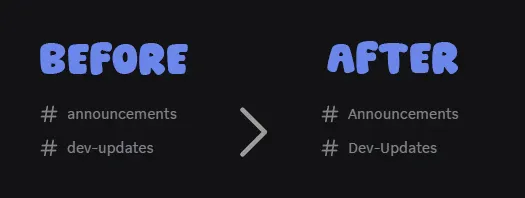
UpperCase Bot allows you to create text channels with uppercase letters using two simple commands, which isn't possible natively.
Stand out on Discord while keeping names readable and easy to moderate.
Is this allowed by Discord ?
Yes. We only use Unicode characters supported by Discord. We use the certified discord.js library.
The uppercase letters look different, is that normal ?
Yes. We don't use classic uppercase letters but a variant, they look very similar to the base ones but the difference is more or less noticeable depending on the device you use.
Can I manually change the channel name afterwards to add an emoji for example ?
Absolutely! You're free to manually add an emoji with a separator once the channel has been renamed with the UpperCase Bot command.
Why does the bot need administrator rights ?
We request "Administrator" permission by default to avoid any conflicts with your channels, categories or roles permissions.
You can reduce these permissions yourself for more security.
It must keep the "View Channels" & "Manage Channels" permissions to work.
rename-channelRename existing channel with uppercase letters
channel* – Select channel to rename
new_name* – New name for selected channel, write with uppercase, they will be replaced by alt uppercase letters
aboutLearn more about UpperCase Bot and get an example of uppercase channels
create-channelCreate channel with uppercase letters
channel_name* – Name for channel to create, write with uppercase, they will be replaced by alt uppercase letters
channel_type – Type for channel to create, Text, Forum or Announcement. Empty: Text
- Announcement:
5 - Forum:
15 - Text:
0
category – Category where the channel will be created
Similar Social Bots
Discover other social bots that might interest you



Popular Discord Bots
Check out the most popular bots in our directory



Discover More Bots
Explore our complete directory of Discord bots to find the perfect ones for your server