
Auto Role Bot avatar

Auto Role Bot

Verified13,100 servers

Media Gallery
Screenshots and videos showcasing Auto Role Bot in action
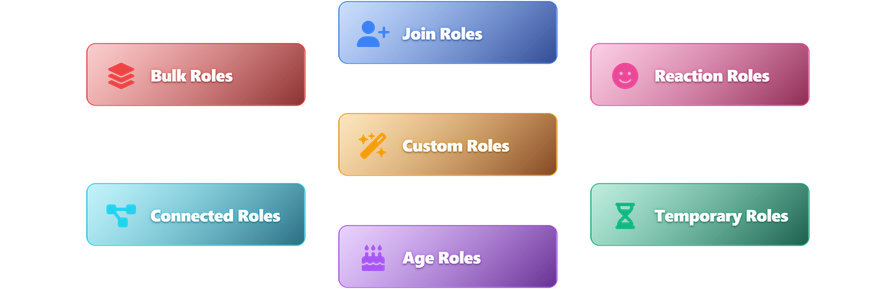
Image
About Auto Role Bot

🤖 Auto Role Bot — Complete Role Automation & Management for Discord

Auto Role Bot is a comprehensive Discord role management solution designed to automate role assignments, streamline server management, and enhance user engagement. Perfect for communities, gaming servers, study groups, and organizations of all sizes.


⚡ Core Features

🎯 Automatic Role Assignment

  • Join Roles: Instantly assign up to 7 roles to new members upon joining
  • Age Roles: Automatically assign roles based on server membership duration (up to 5 age roles, with configurable duration in hours)
  • Tag Roles: Automatically reward users who set your server as their primary Discord tag
  • Connected Roles: Chain role assignments - automatically give roles based on existing roles (up to 5 setups)
  • Reaction Roles: Interactive role assignment through emoji reactions on messages
  • Role Rule Stack Option: Control whether lower roles are removed when members attain higher roles in the hierarchy

Advanced Role Management

  • Temporary Roles: Assign time-limited roles with flexible durations (minutes to months)
  • Individual Role Control: Separate add/remove role buttons for specific members
  • Bulk Role Management: Comprehensive bulk operations for bots, humans, or all members
    • Add or remove roles to multiple members at once
    • Advanced filtering with whitelist/blacklist role support
    • Smart targeting (only affects members who need the role change)
    • Rate-limited processing (2-second delay between assignments)
  • Smart Cleanup: Automatically removes deleted roles from configurations

🎨 Custom Role Personalization

  • Member Customization: Let eligible members create and personalize their own roles
  • Flexible Access Control: Require specific roles (perfect for Boosters, VIPs, Patreon supporters)
  • Full Customization: Names, solid colors, gradients, holographic effects, and icons
  • Smart Positioning: Custom roles automatically positioned above a configurable base role
  • Automatic Cleanup: Roles removed when members lose eligibility or leave the server

🎮 Command Overview

/autoroles - AutoRole Management Hub

Interactive dashboard for managing automatic role assignments:

  • Add Join Role - Set roles for new member auto-assignment
  • ⏱️ Add Timed Role - Set time-limited roles for new members (specify duration in hours)
  • Remove Join Role - Remove roles from auto-assign list
  • ⚙️ Manage Settings - View, list, or clear configurations
  • 🏷️ Set Tag Role - Configure roles for server tag adopters
  • 🔗 Connected Roles - Set up role chains and dependencies

/role - Manual Role Management

Comprehensive role management tools organized into two sections:

👥 Individual Role Management

  • Temporary Role - Assign roles with expiration (format: 1M 3d 1h 8m)
  • Add Role - Add a role to a specific member
  • Remove Role - Remove a role from a specific member

🔄 Bulk Role Management

  • 🤖 All Bots - Bulk role operations for all bot accounts
  • 👥 All Humans - Bulk role operations for all human users
  • 🌐 All Members - Bulk role operations for all server members

Each bulk operation includes:

  • Mode Selection: Add or Remove roles
  • Target Role: Single role to assign/remove
  • Whitelist Roles (Optional): Only affect members with ANY of these roles
  • Blacklist Roles (Optional): Skip members with ANY of these roles
  • Smart Filtering: Only processes members who need the role change

/reactionroles - Interactive Role Assignment

Set up emoji-based role assignment:

  • Add Reaction Role - Create new reaction role setups
  • Remove Reaction Role - Delete existing reaction roles
  • ⚙️ Manage Settings - View or clear all reaction role configurations

Message Commands

  • Setup Reaction Role - Right-click any message → Apps → Setup Reaction Role

/customrole - Custom Role Personalization

Give your members the power to personalize their own roles:

Admin Setup

  • ⚙️ Config - Configure required role and base role positioning

Member Commands

  • ✏️ Name - Set or update custom role name
  • 🎨 Color Solid - Apply solid color (hex code or color name)
  • 🌈 Color Gradient - Apply gradient effect between two colors (requires Enhanced Role Colors perk)
  • Color Holographic - Apply holographic color effect (requires Enhanced Role Colors perk)
  • 🖼️ Icon - Set role icon from emoji or URL (requires Level 2 server boost)
  • 🗑️ Clear - Delete custom role

Perfect for:

  • 💎 Nitro Boosters - Reward your boosters with personalization
  • ⭐ VIP Members - Exclusive customization for premium supporters
  • 🎁 Patreon Supporters - Special perks for your backers
  • 🏆 Active Members - Recognition for top contributors

/help - Interactive Help System

Comprehensive help with detailed explanations for all features and commands.


🚀 Advanced Capabilities

Always Active

  • Instantly detects when members adopt or remove your server tag
  • Automatically expires temporary roles at the exact time they're set to end
  • Processes reaction roles immediately when members click emoji reactions
  • Handles bulk operations smoothly without hitting Discord's limits

Smart & Organized

  • Never lose your configuration - everything is saved automatically
  • Automatically removes deleted roles from your settings
  • Prevents conflicts when multiple operations run at once
  • Temporary roles expire automatically - no manual cleanup needed

Built for Growth

  • Works seamlessly with servers of any size
  • Monitors bot performance and latency in real-time
  • Scales effortlessly as your community grows

Reliable & User-Friendly

  • Clear permission checks prevent setup issues
  • Helpful error messages guide you to solutions
  • Automatic fallbacks ensure nothing breaks your server

🔧 Setup & Configuration

  1. Invite the bot with Administrator permissions
  2. Use /autoroles to set up automatic role assignments
  3. Configure /reactionroles for interactive role selection
  4. Set temporary roles with /role for time-sensitive access
  5. Use /help for detailed guidance on any feature

All commands use modern Discord UI components with interactive buttons, dropdowns, and modals for the smoothest user experience.


📞 Support

Need help or have questions? Join our support server for assistance, feature requests, and community discussion.

Start automating your server roles today - reduce manual work, improve member experience, and build a more organized Discord community.

Popular Commands
Most used commands this month

This bot doesn't seem to use slash commands.

Bot Information
Category
Moderation and Tools

Similar Moderation and Tools Bots

Discover other moderation and tools bots that might interest you

Popular Discord Bots

Check out the most popular bots in our directory

Discover More Bots

Explore our complete directory of Discord bots to find the perfect ones for your server