

CSV,Roles
Verified1,360 servers
Key Features:
- Bulk Role Assignment: Upload a CSV file to assign roles to members identified by ID or username (old and new usernames supported).
- Bulk Role Removal: Just like assignment, except removes the role instead!
- Export Options: Generate a CSV of server members, filterable by roles and user type (human/bot).
- Role Management: View roles, their permissions, and the members assigned to each.
Getting Started:
To ensure smooth operation:
- Limit CSV files to 1000 rows (not including header).
- Process one file at a time per server.
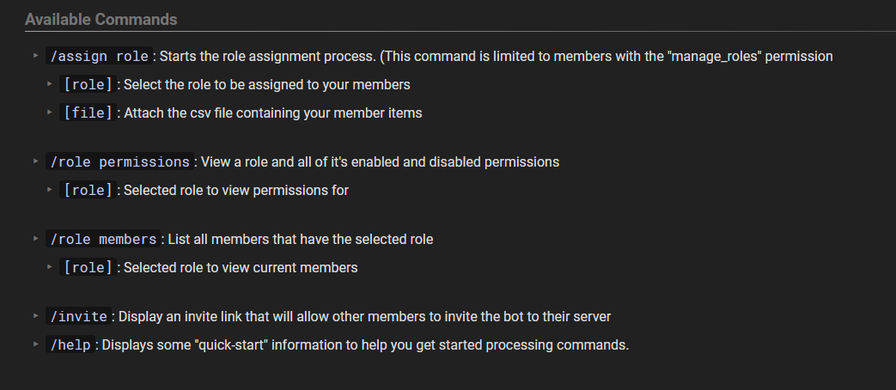
- Use .csv format with member info in the first column. (must contain a header row)
- Be patient. We are at the mercy of Discord API limitations.
Use the /assign role or /remove-role command to start, select a role, and upload your CSV.
The Process:
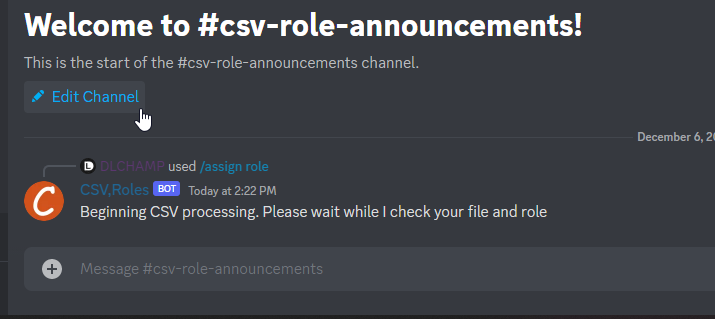
You'll receive live updates throughout the assignment process. Confirmations are required for roles with elevated permissions. Completion is indicated by an embed summarizing the process and an attached log.csv for detailed insights.
Action Outcomes:
- Success: Role assigned to (or removed from) the member.
- Failed: Member not found (likely left the server).
- Skipped: Member already has (doesn't have) the role.
Commands:
/assign-role: Assign a role to members in bulk via CSV upload./remove-role: Remove a role from members in bulk via CSV upload./role permissions: View a role's permissions/role members: View members with the selected role./export-users: Export users to a CSV file./botinfo: View bot information/invite: Invite the bot to another server./help overview: Quick-start guide./help commands: Command overview. Select a command to view more details.
export-usersExport your server members as a CSV file.
linksView links for support, documentation, and invites.
inviteView invite link to add me to another server.
role-
permissions – View a role's permissions.
members – View a list of members currently assigned the selected role.
assign-roleBulk assign a role from a list of members via csv upload.
role* – Name of the role you wish to assign.
file* – Attach the csv file containing your member data.
column-name – Name of the column we should look for your identifiers. Default 1st column.
Similar Utilities Bots
Discover other utilities bots that might interest you



Popular Discord Bots
Check out the most popular bots in our directory



Discover More Bots
Explore our complete directory of Discord bots to find the perfect ones for your server