
Media Gallery
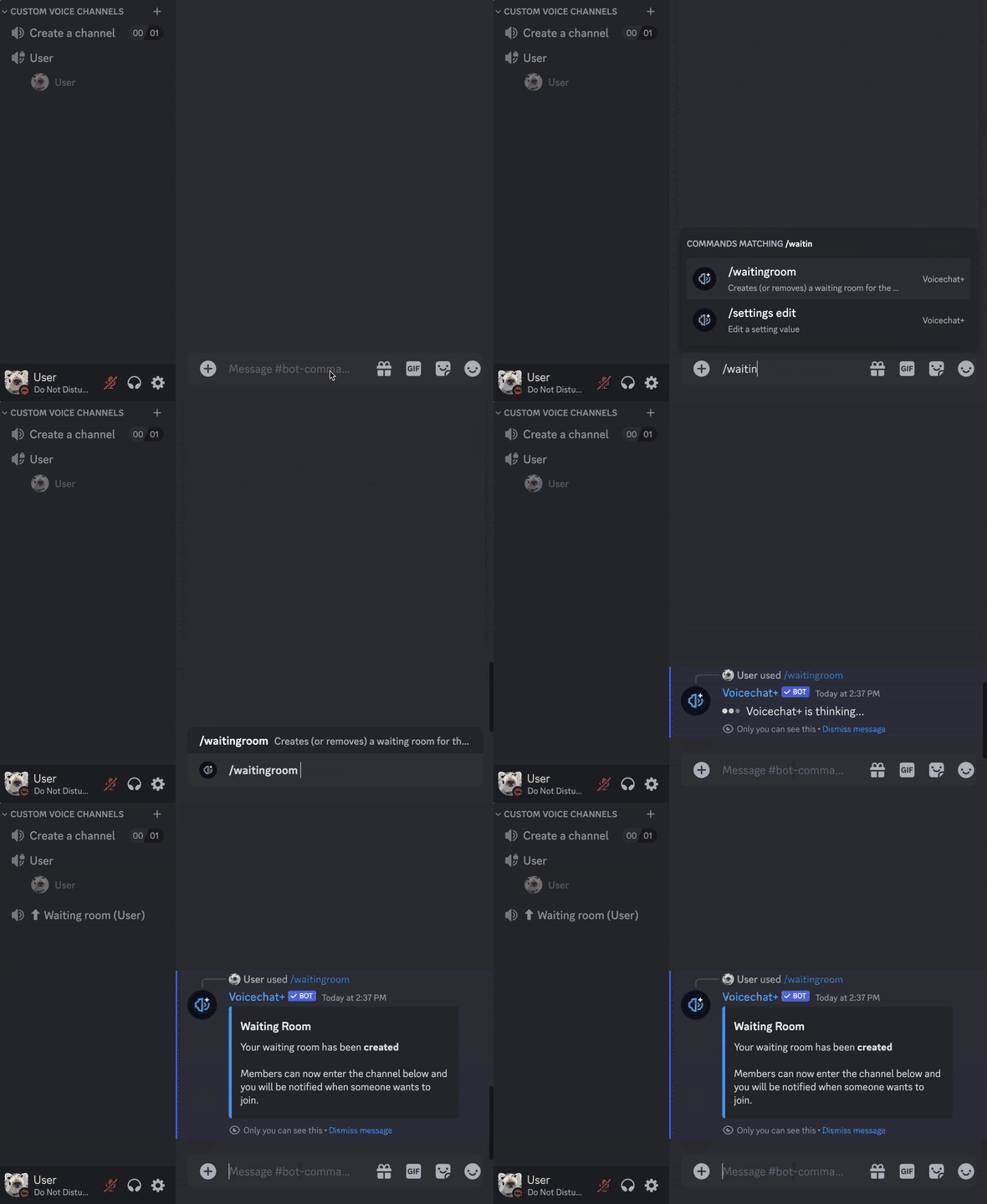
About Voicechat+
Voicechat+ allows for single-click voice channel creation with full customizability. Let users have full control over their voice channel, from toggling a waiting room over limiting the amount of users that can join all the way to renaming their channel to whatever they want.
Voicechat+ Premium ✨ offers even more possibilities for self-moderation, such as banning from and muting users within a voice channel, making server moderation a lot easier and reducing the workload for server staff by a lot.
But those are by far not all of the features Voicechat+ has to offer!
List of features
Free
/waitingroom: Create a waiting room for a voice channel so you can decide who joins your session./private: Limit others from joining your voice channel. Users that are currently in the voice channel will not be kicked./public: Allow others to join your voice channel.
Premium
/rename: Rename your voice channel to anything you want!/ban: Ban a user from your voice channel if they are being disruptive./kick: Kick a user from your voice channel if they are AFK or being disruptive./mute: Mute a user in your voice channel if they are being disruptive./limit: Limit your voice channel to a specific amount of users./silentmode: Make sure only you and the people you want have the permission to speak./owner transfer: Transfer ownership of your voice channel to another user./owner view: View the current owner of a voice channel./claim: Claim a voice channel that currently has no owner./allow: Allow a user to join your private voice channel./alerts: Toggle a ping anytime someone joins your channel’s waiting room.
How to Setup
The setup of Voicechat+ is handled through one simple command: /settings edit.
Within the command, you will be met with 4 different parameters that you can set:
channel-that-creates-channels: Set a voice channel that users can join to create their own voice channel.created-channels-category: Category in which custom voice channels are created.moderator-role: Role that can manage custom voice channels as if they were the channel’s owner. Useful for moderating custom voice channels.waiting-room-alerts: Choose whether the owner of a voice channel is alerted when a user joins the channel’s waiting room. This can be overwritten by the Premium/alertscommand.
Support
For support or troubleshooting of any kind, please join the support server and create a support thread. We will come back to you as soon as possible.
Popular Commands
| Command | Description |
|---|---|
/private | Makes the channel private so that nobody else can join it |
/rename | Renames the voicechat nameThe new name for the voicechat |
/ban | Bans a user from the voicechat memberThe member to ban |
/limit | Limits the amount of people who can be in the voicechat amountThe maximum amount of members to allow in this voicechat |
/waitingroom | Creates (or removes) a waiting room for the channel |
Support Server

Categories
Tags
Monetization
Languages
Links
Similar Bots
Other moderation and tools bots you might like






Popular on UpBot
Trending bots in our directory