
Media Gallery
About Dreamlink
Dreamlink: Cross-Server Chats
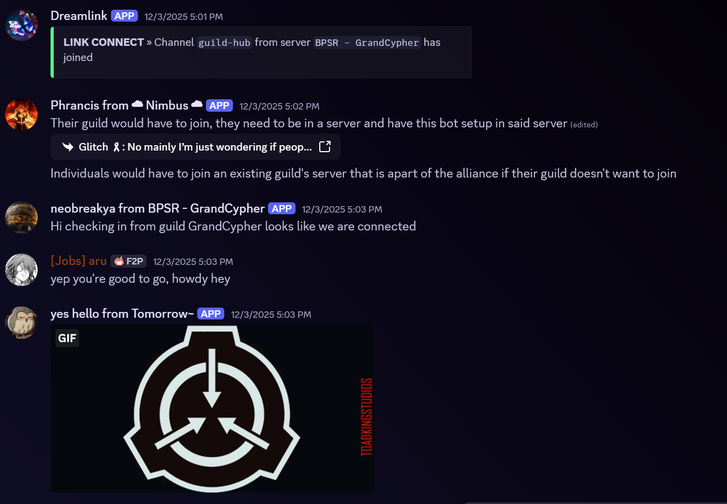
Dreamlink is a powerful bot that creates seamless bridges between channels across multiple servers. Whether you're running a gaming network, a multi-guild alliance, or collaborating between friends, Dreamlink makes communication simple and effortless.
✨ Key Features
- Message Bridge — Connect channels together and relay messages sent in one to all others instantly. All forms of content - including images, videos, emojis, replies, edits and deletes - are supported!
- Party Up — Access a fully featured, infinitely customizable cross-server Party/Raid Organizer, built directly into Dreamlink!
- Moderation Tools — Take full control of your links with bans, timeouts, message moderation, administrative roles, and more.
- Customization Core — Customize how relayed messages and author names appear, including per-server specific overrides, shared pings, and more.
- Privacy Focused — Maintain your utmost privacy and security. Messages are never saved and inaccessible to anyone outside of your channels.
- Easy Setup — No complicated configuration. Create a link, share the code, and you're connected!
🔥 Perfect For
- Gaming Communities — Unite multiple alliance guilds under one communication network
- Event Coordination — Connect event organizers across different community servers
- Collaborative Projects — Bridge team channels for seamless cross-organization chats
- Social Networks — Chat with friends and groups from all over
💬 Get Started
- Invite Dreamlink to your server (and any server you want to link with)
- Run
/createlinkto create your link - Share the Link ID with another server
- They run
/addlinkwith your Link ID - You're now connected!
Check out /managelink menu for a fully featured management and customization UI
Need help? Have questions? Join our support server to learn more about all the features Dreamlink has to offer.
Popular Commands
| Command | Description |
|---|---|
/linksettings | Modify settings for a link network you own/administrate menuOpen the settings dashboard modify-formattingModify the username formatting approvalManage approval settings specialized-formattingManage per-server formatting overrides audit-logsManage the link's administrative audit log message-logsManage the link's message edit/deletion log |
/help | View the quick start guide or specific command information commandName of a specific command to view details for |
/createlink | Create a new cross-server network link with your own unique link ID link-idID of new link to allow other servers to join (caps insensitive) channelFirst channel to add to the link approvalWhether new server joins should require manual approval (can be changed later) |
/addlink | Adds a channel to join a network link link-idID of link network to connect a channel to (caps insensitive) channelChannel to add to the link |
/approvalqueue | View all current approval requests for joining a link you own/administrate link-idID of link to view approval requests for (caps insensitive) |
Categories
Tags
Monetization
Languages
Links
Similar Bots
Other moderation and tools bots you might like






Popular on UpBot
Trending bots in our directory