
Media Gallery
Image
Image
About StickMe
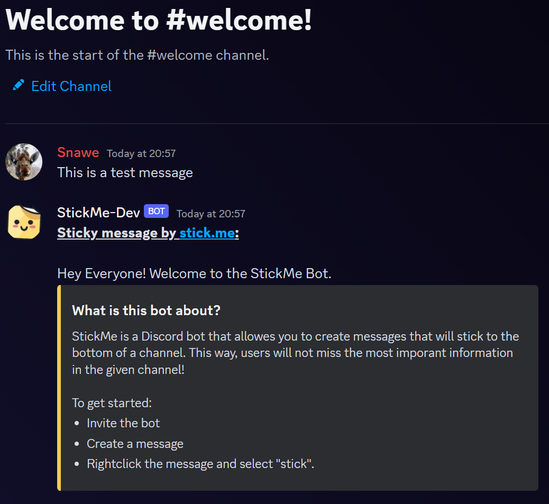
You have important messages that always get lost in busy channels? StickMe let's you stick any message to the bottom of the channel!
How Does It Work?
- Create -- Create a message.
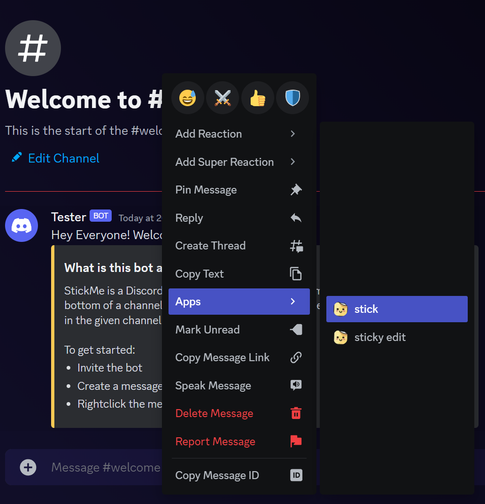
- Stick It -- Rightclick the message => "App Commands" => "stick"
- Try It -- Send a message to the channel. The bot should recreate the sticky message!
NOTE: StickMe recreates a message at most once every minute in order to avoid spamming the Discord API!
Intervals:
You can choose between different recreation intervals!
- Time based: Recreation happens after x minutes/hours/days.
- Idle time based: Recreation happens only if no new message was sent in the channel for x minutes/hours/days.
- Message based: Recreation happens every x messages.
Popular Commands
| Command | Description |
|---|---|
/remind | reminder commands meCreates a reminder usCreates a public reminder getGet your reminders |
/poll | poll commands createCreates a poll deleteRemoves and deletes a sticky note |
/permission | Checks if the bot has the needed permissions |
/bot | bot commands avataravatar commands bannerbanner commands |
/sticky | sticky commands createCreates a sticky note editEdits a sticky note removeRemoves and deletes a sticky note unstickRemoves the stickiness of a note without deleting it configConfigure default sticky settings |
Categories
Tags
stickutility
Monetization
Languages
British English
Similar Bots
Other moderation and tools bots you might like






Popular on UpBot
Trending bots in our directory