
Media Gallery
About ComebackTwitterEmbed
ComebackTwitterEmbed
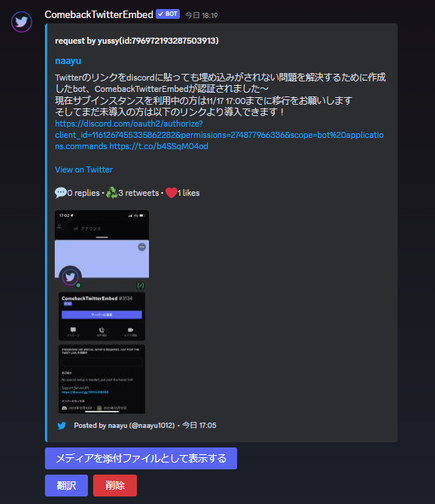
A bot that expands the contents of tweets as they are no longer embedded even if you post a twitter URL on discord.
List of features
When a Twitter link is posted, it automatically displays the contents, reps, RTs, number of likes, etc. Only when the button is operated, a message is displayed in either English or Japanese depending on the user's language.
The button to reattach a photo as an attachment is implemented because it is not displayed on smartphones even if an image is embedded.
The code to return a photo attached as an attachment to an embedded image is also implemented.
The user or channel role that you don't want to have automatic deployment can be specified. If a tweet contains words specified by the server administrator, you can add a setting to remove the link without expanding it.
The person who posted the link or the person who has the authority to manage the message can remove the embedding by pressing the red button.
If there is a difference between the language of the tweet and the language of the user, a button will be added to translate the contents of the tweet.
When only a link is posted, the original text can be deleted and only the expansion can be left by using the settings command.
When you post a link with
Why did I want to create it?
Due to a change in the twitter specification, the contents of a twitter URL are no longer automatically expanded when it is posted to the discord.
There are some tools such as vxtwitter that allow you to change the url to display the content, but honestly speaking, I found it tedious to change the url every time and then post it.
I felt that the convenience of sharing URLs was halved, so I decided to create a bot that automatically retrieves and displays the contents of Twitter links when they are posted.
Also, I was dissatisfied that the stock automatic embedding function only shows the first image when viewed from a smartphone, so I made it so that all images can be viewed from a smartphone as well.
The article is available on qiita
Popular Commands
| Command | Description |
|---|---|
/ping | Pong! |
/checkmyguildsettings | Check guild settings guildGuild ID to check |
/et | Expand a tweet with optional quote repost depth. urlTwitter/X status URL, or a tweet id when account is set. depthQuote repost expansion depth. 0 means unlimited. saveApply this quote repost depth to future expansions. accountTwitter/X account handle. Automatically saves this depth for the account. |
/guisetting | Change settings with a GUI providerProvider to open first |
/settings | change settings importImport GUI-editable settings from another server disabledisable defaultlanguagedefaultLanguage editoriginaliftranslateeditOriginalIfTranslate extractbotmessageextractBotMessage button_invisiblebutton invisible settings button_disabledbutton disabled settings bannedwordsbannedWords setdefaultmediaasattachmentssetSendMediaAsAttachmentsAsDefault deleteifonlypostedtweetlinkdeleteIfOnlyPostedLink alwaysreplyifpostedtweetlinkalwaysReplyIfPostedLink anonymousexpandanonymous expand legacymodelegacy mode twittertwitter settings pixivpixiv settings |
Support Server

Categories
Tags
Monetization
Languages
Links
Similar Bots
Other moderation and tools bots you might like






Popular on UpBot
Trending bots in our directory