Media Gallery
Image
Image
Image
About Logo Maker
Create Stunning Logos with Logo Maker!
Meet Logo Maker, #1 Discord bot for designers.
Create professional logos for designers and personal use, all implemented on the Discord App.

Easy to Use:
Create logos in just a few clicks with our easy-to-use interface.
Customization:
Customize your logo with a wide range of shapes, colors, and design elements to make it your own.
Variety:
Choose from our collection of shapes to use in your design
Export Options:
Download your logo in a variety of file formats, including PNG, JPG, and GIF, for use across platforms.
Coloring Tools:
Add colors to your logo, if it's a solid color, gradient or transparent.
Branding:
Write your brand on the logo in the most fitting way.
See the Bot in Action:
Check out these step-by-step screenshots of the Logo Maker bot in use.
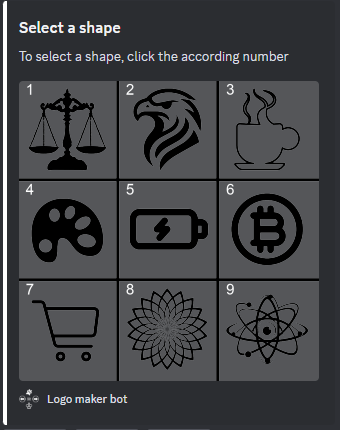
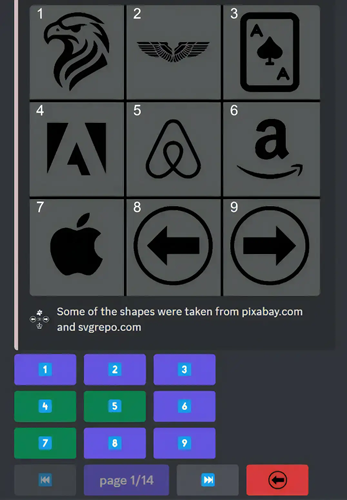
Step 1: Select a Shape
Choose from our collection of shapes to use in your design
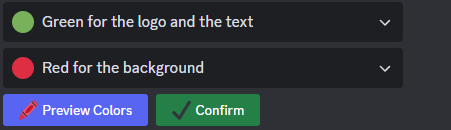
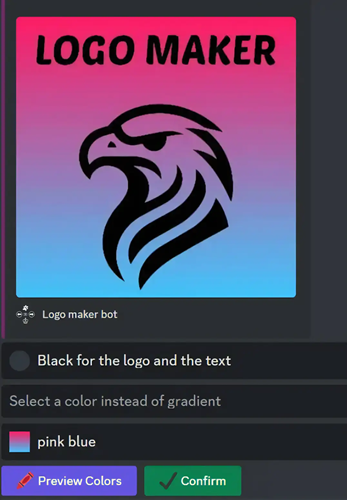
Step 2: Add colors
Add colors to your logo, if it's a solid color, gradient or transparent.
Step 3: Download and Use
Export your logo in various file formats or as Discord emojis.
Join our Designers Community
Our Website!
© 2024 Quack Bots. All rights reserved.
Popular Commands
| Command | Description |
|---|---|
/premium | Support us and get access to premium features! |
/create | Create a new logo! |
/recent | View your recent logos! |
/info | See info and stats about the bot! |
/ping | Check the bot's latency |
Categories
Tags
createavatardesignsocialutility
Monetization
Languages
American English
Similar Bots
Other utilities bots you might like




Popular on UpBot
Trending bots in our directory