
Media Gallery
YouTube
About LaTeX
Discord LaTeX Bot by SleepPandas
A Discord bot that compiles LaTeX into PNG images so math, physics, and engineering conversations stay readable. It is built for study servers, class groups, and anyone who is tired of math getting lost in plain text.
About the project
I wanted a tool that could render LateX in DMs and on Servers. Addtionally I wanted to be able to generate or copy full Latex documents and have them render too! Heres what it does:
- Reliable rendering for both quick inline math and full document/TikZ snippets
- Fast interaction so the bot does not hang while compiling
Core Features
/latexcompiles LaTeX and posts a rendered PNG- Supports inline expressions and full-document/TikZ workflows
- Works in servers, DMs, and private channels
- Optional
/talk-to-mecommand powered by Google's Gemini ecosystem - Legacy
latex {LaTeX Code}message command support in servers - Button to Edit Code Instead of retyping on Error

Commands
| Command | Description |
|---|---|
/latex-inline <latex_code> |
Render LaTeX into a PNG image. |
/latex |
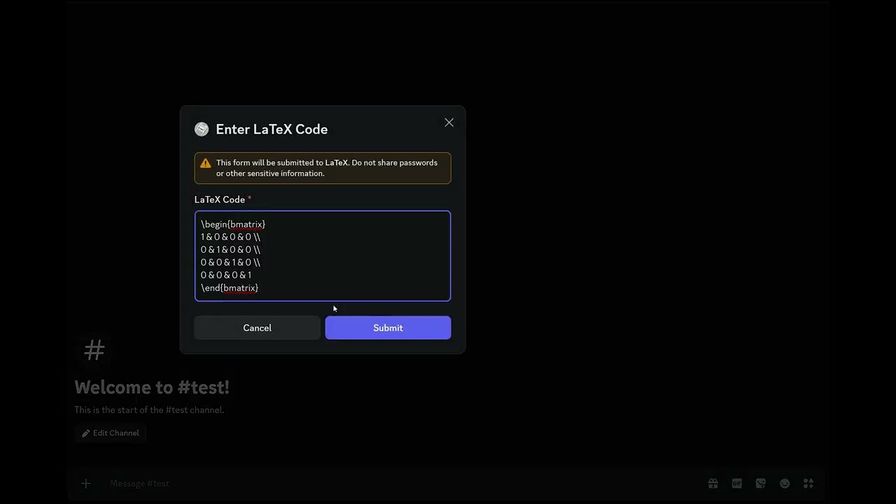
Opens a Window you can enter your LaTeX code to. |
/help |
Show command and usage guidance. |
/ping |
Health check command. |
/talk-to-me <message> |
Optional conversational command. |
/clear-history |
Clear chat history used by /talk-to-me. |
latex <latex_code> |
Legacy message-based render command (server messages). |
Invite Links
- DM install:
https://discord.com/oauth2/authorize?client_id=1242573317693640788
Example Usage
TikZ Example (full document)
latex
\documentclass[border=1mm]{standalone}
\usepackage{tikz}
\usepackage{amsmath}
\begin{document}
\begin{tikzpicture}[scale=1.5,>=stealth]
    \draw[->] (-0.5,0) -- (3,0) node[right] {$x$};
    \draw[->] (0,-0.5) -- (0,3) node[above] {$y$};
    \draw[thick, blue] (0,0) -- (2.5,1.5) node[above right] {$\mathbf{v}$};
    \draw[thick, red] (0,0) -- (2,1.2) node[below right] {$\text{proj}_{\mathbf{u}} \mathbf{v}$};
    \draw[dashed] (2,1.2) -- (2.5,1.5);
    \draw[dashed] (2,1.2) -- (2,0);
    \draw[thick] (0,0) -- (2,1.2) node[midway, below left] {$\mathbf{u}$};
    \draw[fill] (2,1.2) circle (1pt);
    \draw[fill] (2.5,1.5) circle (1pt);
\end{tikzpicture}
\end{document}

Inline Expression Example / modal
/latex , open up modal then enter in your code
/latex \[ \hat{f}(\xi) = \int_{-\infty}^{\infty} f(x) e^{-2\pi i \xi x} \, dx \]

Popular Commands
| Command | Description |
|---|---|
/talk-to-me | LaTeX Bot Sentience user_message… |
/clear-history | clears chat history |
/latex-inline | Render single-line LaTeX without opening the modal latex_code… |
/latex | Open a modal to enter LaTeX code |
/help | See Features and Commands |
Categories
Tags
latexmathphysicsutilitiestikz
Monetization
Languages
British English
Links
Similar Bots
Other utilities bots you might like






Popular on UpBot
Trending bots in our directory