
Media Gallery
About Streamlinx
Stream Notifications for Twitch, YouTube & Kick
Get instant Discord notifications when your streamers go live, upload a video, or clip a highlight. Three platforms, one bot, zero commands required.
Stream Alerts
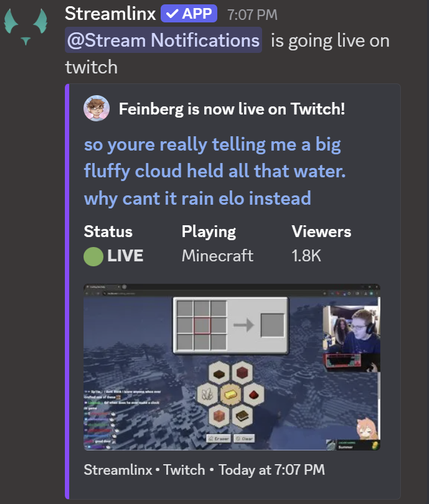
Go-live and offline notifications across Twitch, YouTube, and Kick with live thumbnails, game box art, and interactive Watch/Channel/VOD buttons. Customize every notification with message templates using variables like {title}, {game}, {viewers}, and {url}. Route different streamers to different channels with custom embed colors per streamer.
Upload & Clip Alerts
Get notified when streamers upload a YouTube video (with optional Shorts filtering) or when a Twitch clip is created. Same customizable templates and channel routing as stream alerts.
Stream Cleanup
Choose what happens when streams end: edit the notification with stream stats, send a new offline message, or delete it entirely. Keep your notification channels clean automatically.
Live Roles
Auto-assign a Discord role when members start streaming on Twitch. Filter by existing roles to control which members get the live role.
Web Dashboard
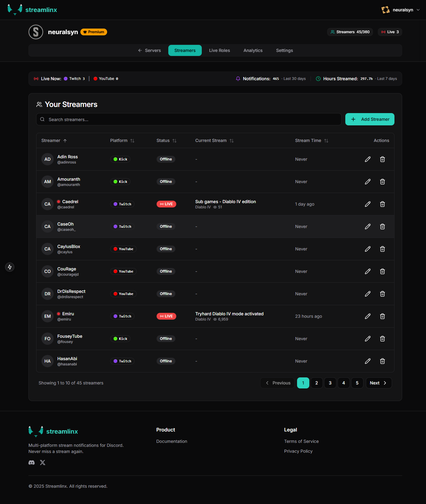
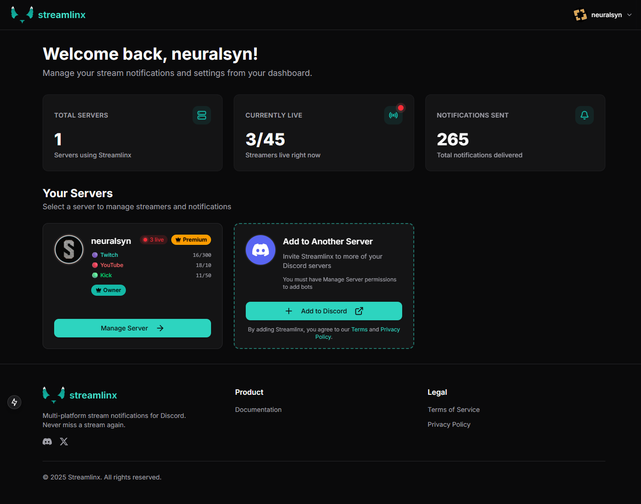
Manage your streamers, customize notifications, and configure every setting from a browser at streamlinx.io. Add streamers, edit templates, configure quiet hours — no slash commands to memorize.
Go Further with Premium
Premium unlocks the full toolkit for $2.99/month through Discord.
Up to 360 streamers — 300 Twitch, 10 YouTube, and 50 Kick (free tier includes 15). Analytics dashboard with activity heatmaps, peak streaming hours, streamer leaderboards, and game distribution. Quiet hours let you schedule notification-free windows with a morning catch-up summary. Custom webhooks send notifications from your own bot name and avatar. Notification filters restrict alerts to specific games or title patterns. Cooldowns prevent spam from unstable connections. Streak tracking awards consecutive streaming day badges. Advanced live roles support up to 5 configurations with blacklist mode.
Get Started
- Invite Streamlinx from this page
- Visit streamlinx.io and log in with Discord
- Add your streamers — that's it
Popular Commands
| Command | Description |
|---|---|
/streamer | Commands for managing streamers addAdd a streamer to track removeRemove a streamer from tracking |
/admin | Bot administration commands (owner only) syncSync slash commands (owner only). subscriptionSubscription management commands (owner only) |
/help | Show help information about available commands. |
/portal | Get a link to the Streamlinx web portal. |
/subscription | Show the current subscription status for this guild. |
Categories
Tags
Monetization
Languages
Similar Bots
Other entertainment bots you might like






Popular on UpBot
Trending bots in our directory