Media Gallery

About VRC Verifier
New: a Linked role, so servers that aren't 18+ can use VRC Verify too
VRC Verify brings VRChat's own 18+ age verification into your Discord server. A member links their VRChat account, VRC Verify reads whether VRChat has age-verified them, and the bot assigns your 18+ role. No documents, no photos, and no admin has to review anything.
Not an 18+ server? You can also give a Linked role to everyone who links their VRChat account, 18+ or not. Use it on its own or alongside your 18+ role.
Verification is free, and always will be. No cap, nothing to unlock. Premium adds automation around it for servers that want more.
Free on every server
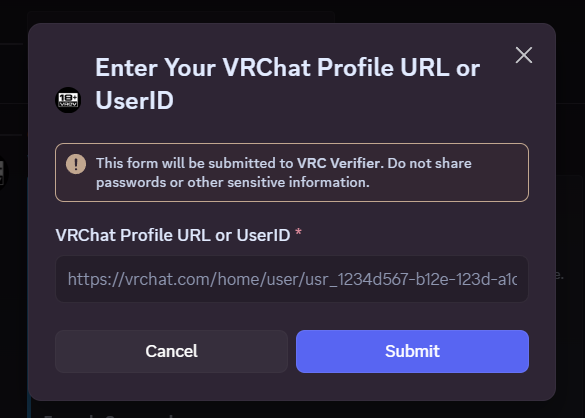
- 18+ Verification Members press a button, add a one-time code to their VRChat bio to prove the account is theirs, and get your 18+ role once VRChat confirms they're 18+.
- Linked Role Give a role to every member who links a VRChat account, whether or not VRChat shows them as 18+. Members who are 18+ get both roles.
- Automatic Verification on Join Members already verified or linked through VRC Verify in another server get their roles the moment they join yours. On by default.
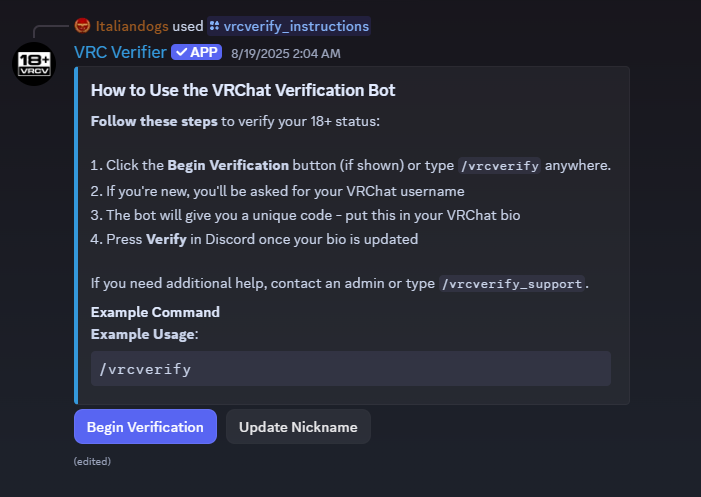
- Interactive Instruction Panel Post a panel in any channel with one command. Members follow the steps with buttons and get live status updates without leaving Discord.
- Update Nickname Button Members can match their server nickname to their VRChat name in one click.
- Web Dashboard Sign in with Discord and manage every server from one place. The Overview charts 30 days of verifications and warns you when something breaks, like a deleted role, a missing permission or a panel that's gone.
- 12 Languages The bot, dashboard and website speak English, Spanish, Chinese, Japanese, German, Dutch, Hindi, Arabic, Bengali, Portuguese, Russian and Punjabi.
- Public Status Page status.vrcverify.com shows whether verification, the bot and the dashboard are working, with 90 days of history.
VRC Verify Premium
One subscription covers the whole server.
- VRChat Group Invites: offer members an invite to your VRChat group, either 18+ members only or anyone who has linked. Nothing is sent to VRChat unless the member presses the button.
- Verify Existing Members: give your 18+ role to everyone in your server who has already verified with VRC Verify, all at once. Nobody is messaged. Counting them is free.
- Group Calendar in Discord Events: your VRChat group's events appear in the Events tab and stay in sync, so members get Discord reminders in their own time zone. Join links are posted when an instance opens.
- Join Requests with Approve and Deny: requests to join your VRChat group are posted in a channel you choose. Each one shows whether the person is in your server and verified 18+, so moderators can decide without leaving Discord.
- Verification Activity Log: every verification in a channel you choose, including the ones that would otherwise fail silently.
- Automatic Removal of the Unverified Role
- Automatic Nickname Sync with VRChat
- Custom Post-Verification Message
- Your Color and Server Icon on the instruction panel
- Priority in the Verification Queue when there's a backlog
- Shorter Verification Cooldown
Two ways to buy: in Discord (billed monthly), or by card on the dashboard, which also has 6- and 12-month plans that cost less. Card subscriptions start with a 14-day free trial for servers that haven't had Premium before.
Why Trust VRC Verify?
- VRChat Does the Age Check Your members' documents stay with VRChat. The only thing VRC Verify receives is a yes or a no.
- No Manual Override Admins can't mark anyone verified by hand, so your 18+ role always means what it says.
- One VRChat Account per Member A member's link can't be switched to a different VRChat account, and an account can't be claimed by someone else.
- Minimal Data VRC Verify doesn't store members' VRChat display names or bios, and never handles card details. Payments go through Discord or Stripe.
- The Dashboard Holds No Keys The website never sees the bot's token or database. It signs you in with Discord and only shows the servers you manage.
- Members Choose Their Invites VRChat group invites only go out when a member asks for one.
- Proven in the Wild Used by dozens of VRChat communities, from large events to private clubs and multi-server networks.
Quick Start
Set your roles
/vrcverify_setup verified-role:
linked-role: unverified-role: Set the 18+ role, the Linked role, or both. Put the VRC Verify role above them in Server Settings → Roles, and make sure it has Manage Roles, so it can assign them.
Post the instruction panel
/vrcverify_instructions
Members click through the panel to verify.
Configure everything else on the dashboard
/vrcverify_settings
Shows your current setup and links to the dashboard, where you can set nicknames, the activity log, panel branding, your VRChat group and who it invites, calendar sync, join requests and your subscription.
Check that everything is working
/vrcverify_status
Confirms your roles and instruction panel still work.
Members can also start verifying any time with /vrcverify. Use /vrcverify_subscription to see or buy Premium, and /vrcverify_support for help.
Popular Commands
| Command | Description |
|---|---|
/vrcverify | Link your VRChat account and verify your 18+ status |
/vrcverify_settings | Admin: See this server's settings and open the dashboard. |
/vrcverify_support | Get help with the VRChat 18+ verification process. |
/vrcverify_setup | Admin command: set the verified role, the Linked role, or both for this server. verified-roleRole for members VRChat reports as 18+ (leave out to keep the current one) linked-roleRole for everyone who links a VRChat account, 18+ or not (leave out to keep the current one) unverified-roleOptional role to remove from users once verified (leave out to clear it) |
/vrcverify_instructions | Admin only: Post instructions for using the verification bot. |
Categories
Tags
Monetization
Languages
Similar Bots
Other moderation and tools bots you might like






Popular on UpBot
Trending bots in our directory