
Media Gallery
About LevelCord
📊 LevelCord – Advanced Leveling & XP System
LevelCord is a feature-rich Discord leveling bot that helps increase engagement in your server by rewarding members with XP, levels, and role rewards for participating in the community. It's fully customizable, giving you control over how XP is earned, progression speed, and how level-ups are celebrated.
⚙️ Configuration Commands (/config)
These commands let server admins fine-tune how the leveling system works:
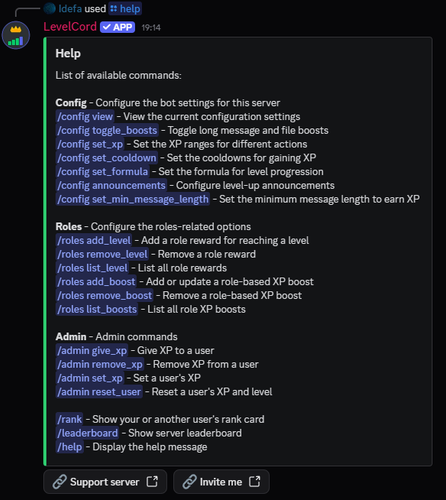
- /config view → View the current server configuration.
- /config toggle_boosts → Enable/disable XP boosts for long messages and file uploads.
- /config set_xp → Set XP ranges for actions like messages, reactions, or time spent in voice.
- /config set_cooldown → Define cooldowns between XP gains for each action.
- /config set_formula → Choose how levels scale:
exponential,linear, orconstant. - /config announcements → Customize how level-up announcements are sent (disabled, same channel, temporary message, or dedicated channel).
- /config set_min_message_length → Set the minimum number of characters required in a message to earn XP.
🏅 Role Rewards & Boosts (/roles)
LevelCord lets you reward active members with roles or grant special XP boosts:
- /roles add_level → Assign a role when a user reaches a specific level (optionally remove old roles).
- /roles remove_level → Delete a role reward for a specific level.
- /roles list_level → Display all configured role rewards.
- /roles add_boost → Give a role an XP boost (e.g., VIP members earn +25% XP).
- /roles remove_boost → Remove a role-based XP boost.
- /roles list_boosts → Show all role XP boosts.
🔑 Admin Commands (/admin)
Tools for server admins to directly manage user XP and progression:
- /admin give_xp → Manually give XP to a user.
- /admin remove_xp → Deduct XP from a user.
- /admin set_xp → Set a user's XP to a specific amount.
- /admin reset_user → Reset a user's XP and level.
👤 User Commands
Fun commands for everyone to check progress:
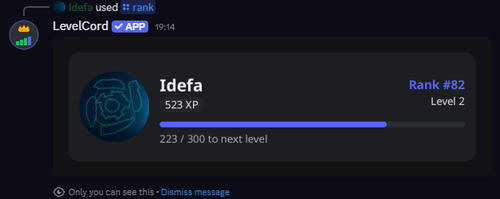
- /rank → Show your (or another member's) rank card with level, XP, and progress bar.
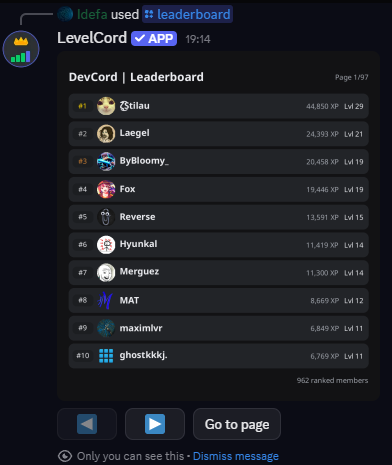
- /leaderboard → Display the server leaderboard of top-ranked users.
- /help → Show the command list and bot help menu.
🔄 Extra Functionality
- XP Recalculation (Server-request only): A server can request to recalculate XP for old messages, ensuring members' progress reflects their historical activity.
✅ Why Use LevelCord?
- Customizable leveling formulas
- Role-based rewards & XP boosts
- Fair anti-spam measures (cooldowns, min message length)
- Multiple announcement styles
- Easy-to-use admin tools
- Clean rank cards & leaderboards
Popular Commands
| Command | Description |
|---|---|
/leaderboard | Show server leaderboard visibleWhether the response should be visible to everyone |
/admin | Admin commands give_xpGive XP to a user remove_xpRemove XP from a user set_xpSet a user's XP reset_userReset a user's XP and level |
/rank | Show your or another user's rank card userThe user to check rank for visibleWhether the response should be visible to everyone |
/roles | Configure the roles-related options add_levelAdd a role reward for reaching a level remove_levelRemove a role reward list_levelList all role rewards add_boostAdd or update a role-based XP boost remove_boostRemove a role-based XP boost list_boostsList all role XP boosts |
/config | Configure the bot settings for this server viewView the current configuration settings toggle_boostsToggle long message and file boosts set_xpSet the XP ranges for different actions set_cooldownSet the cooldowns for gaining XP set_formulaSet the formula for level progression announcementsConfigure level-up announcements set_min_message_lengthSet the minimum message length to earn XP toggle_loggingToggle logging for command usage ignore_channelIgnore a channel or a category unignore_channelUnignore a channel or a category list_ignoredList all ignored channels |
Categories
Tags
Monetization
Languages
Links
Similar Bots
Other social bots you might like






Popular on UpBot
Trending bots in our directory