
Media Gallery
About ProTickete✨
1) Ticket panel
- Lets admins post a ticket panel message in a chosen channel.
- Panel can be either:
Dashboard website
- A single Open Ticket button, or
- A dropdown menu of reasons (up to 24 options).
- Panel embed is configurable: title, description, footer, color, image, and the open button label/style/emoji.
2) Opening tickets
When a user opens a ticket:
Checks if tickets are enabled
Checks a blacklist role (if user has it → blocked)
Enforces max open tickets per user
Creates a private text channel under the configured category with permission overwrites so:
- Only the ticket owner, bot, and staff roles can see it
Sends a “ticket created” message using a customizable template (embed + optional external text)
- Supports placeholders:
{ticketowner},{servername},{reason}
- Supports placeholders:
Adds a ticket controls row inside the ticket: Claim / Transcript / Close
Ticket opening mode:
- Instant: creates ticket immediately
- Modal: pops a modal asking for a reason (stored on the ticket)
3) Staff permissions / roles
Staff access is determined by:
- Admin permission, OR
- Having one of the configured supportRoleIds
Certain actions are staff-only: claim, transcript, close, delete.
4) Claiming + unclaiming tickets
Claim button:
Marks ticket as claimed by the staff member
Locks the channel so only:
- Ticket owner
- Claimer can view/send (it hides staff roles from the channel)
Optionally moves the channel to a configured “claimed tickets” category
Logs the claim event to the logs channel (if set)
Unclaim command (
!unclaim):- Only the current claimer or an admin can unclaim
- Restores visibility for all staff roles
- Removes the claimer overwrite
- Moves ticket back to the Open Tickets Category (if configured)
- Logs the unclaim event
5) Transcripts (HTML + optional website upload)
Transcript button:
Fetches up to 2500 messages from the ticket channel
Converts messages into TicketTool-style transcript data (content, embeds, attachments)
Builds an HTML transcript that uses TicketTool’s transcript bundle to render
Creates an HTML file attachment and sends it to:
- Transcripts channel (or logs channel fallback), and
- DMs the ticket owner
If configured with env vars, it also uploads the transcript HTML to your website API:
- “View Transcript” (link)
- “Generate New Transcript” (regen)
Regenerate transcript button:
- Only staff or the ticket owner can use it
- Downloads the HTML attachment from the old transcript message
- Re-uploads it to your transcript website API
- Updates the buttons with the new transcript link
6) Closing tickets
When staff closes a ticket:
Shows a close modal (optional reason input)
Immediately disables the ticket control buttons on the ticket’s main control message
Builds an HTML transcript and sends it to:
- transcripts/log channel
- DMs the owner
- (and uploads to website if configured)
Marks the ticket record as closed with timestamp + reason
Posts public embeds in the ticket channel:
- “Transcript” notice (where it was sent/saved)
- “Ticket Closed” notice (owner will be removed)
Removes the ticket owner’s permission overwrite (they can no longer view/send)
Optionally moves the channel to a configured “closed tickets” category
Sends a “Delete confirmation” embed with a Delete button (staff-only)
7) Deleting tickets (channel delete)
If staff clicks delete confirmation:
- Bot deletes the channel
If a ticket channel is deleted manually:
- The bot detects the delete event
- Marks the ticket as closed (“deleted” reason)
- Logs the deletion
- Sends transcript/log embed (no transcript file in this path unless it existed)
- DMs the owner informing them it was deleted/closed
There’s also a prune function that scans stored open tickets and closes any whose channels no longer exist.
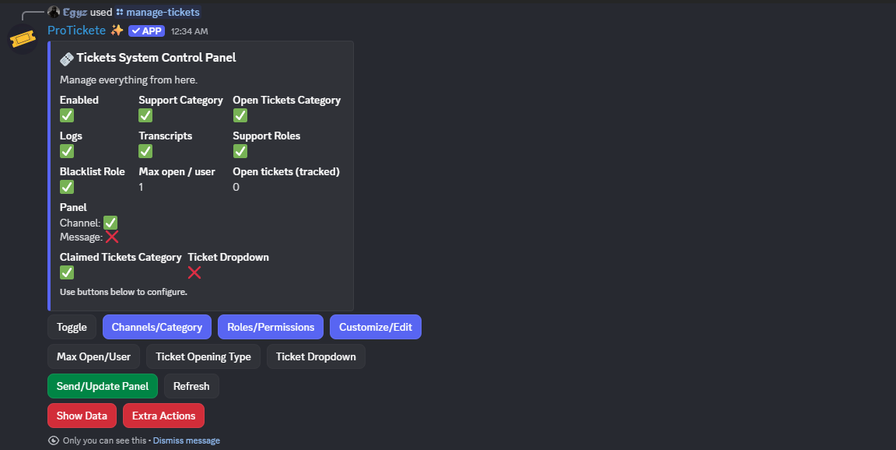
8) Admin control panel (/tickets-system)
Admins can configure everything via buttons + modals:
Toggle system enabled
Set:
- Support category (fallback)
- Open tickets category (where new tickets are created)
- Logs channel
- Transcripts channel
- Panel channel
- Staff roles
- Blacklist role
- Max open tickets per user
Edit panel embed:
- title, description, footer, color, image URL
Edit open button:
- label, style, emoji
Set ticket opening type:
- instant vs modal + reason placeholder
Edit “created ticket” template (embed + external text + color + footer)
Edit ticket channel name template (supports
{username},{userid}, etc.)Edit ticket control button labels (and can disable transcript button by making label empty)
Configure:
- Move claimed tickets (enable + select category)
- Move closed tickets (enable + select category)
- Ticket dropdown reasons (enable/disable, add/edit/delete options)
“Show Data” displays full current config + a preview of the panel
9) Auto-setup command
An auto-setup flow that can:
- Create “Open Tickets” category
- Create a “ticket-panel” channel
- Create a “tickets-log” category
- Create “tickets-log” and “tickets-transcript” channels
- Save config automatically
- Post the default ticket panel message
- Optionally let the user pick staff roles afterward (paged role picker)
Popular Commands
| Command | Description |
|---|---|
/help | 📌 Learn how to set up tickets and use the dashboard |
/manage-tickets | 🎫 Manage the tickets system with full customization |
/support-us | ✨ Support ProTickete by voting and leaving feedback |
/dashboard | Open your server dashboard: tickets, transcripts, settings and staff insights |
/auto-setup | ⚡ Automatically set up your ticket system |
Support Server

Categories
Tags
Monetization
Languages
Similar Bots
Other moderation and tools bots you might like






Popular on UpBot
Trending bots in our directory