

- Servers
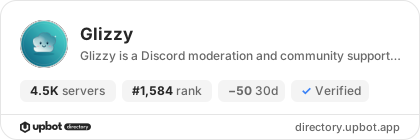
- 4,560
- Rank
- #1,58455 in 30 days
- Last 7 days
- −20(-0.4%)
- Last 30 days
- −50(-1.1%)
About Glizzy
Glizzy — Community Moderation & Support Glizzy helps Discord communities stay organized with practical moderation tools, private support tickets, and a web dashboard.
Moderation: Warn members and review warning history, apply timeouts, kick or ban members, and bulk-delete recent messages. Moderation actions check Discord permissions and role hierarchy.
Support tickets: Configure a ticket panel from the dashboard. Members can open private support channels, and staff can manage and close tickets.
Community tools: Configure welcome messages, review applications, send announcements, and manage bot appearance and voice-channel audio playback.
Dashboard access: The configured administrator can manage all accessible servers through Discord sign-in.
Growth History
Server count trends over the last 6 months
Popular Commands
| Command | Description |
|---|---|
/automod | Set up and manage Discord AutoMod protections setupCreate spam, mention-raid, and harmful-content rules statusList this server's AutoMod rules disableRemove AutoMod rules created by Glizzy |
/purge | Bulk-delete recent messages in this channel amountNumber of messages to delete (1-100) |
/announcement | Sends an announcement messageThe message to be sent |
/ban | Ban a member from this server userMember to ban reasonReason for the ban |
/welcome-editor | Edit welcome message text and optional image URL messageWelcome text. Use {user} and {server} placeholders. image_urlOptional image URL for the welcome embed clear_imageRemove current welcome image |
Frequently Asked Questions
Widget for Glizzy
Do you develop Glizzy? Show its server count, rank and growth on your website or README. Use the PNG where SVG images are not supported.
[](https://directory.upbot.app/bots/1437203189651865643)Categories
Tags
Monetization
Languages
Similar Bots
Other social bots you might like


