
Media Gallery
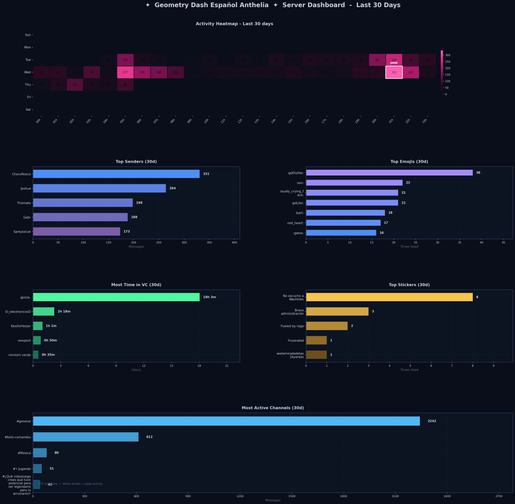
About Counter-Stats
📊 CounterDiscord — Server Analytics Bot
CounterDiscord tracks everything that happens in your Discord server and turns it into beautiful, detailed visualizations. No setup required — just invite the bot and it starts collecting data immediately.
📈 What It Tracks
- Messages — every message per user, channel, and time
- Emojis — custom and standard emoji usage in messages and reactions
- Voice channels — time spent in VC per user
- Words & phrases — configurable keyword tracking
- Replies & mentions — who interacts with who
🎨 Commands
Stats
/leaderboard— top message senders bar chart/activity— server activity heatmap by hour and day of week/vc-leaderboard— who spends the most time in voice channels/top-emojis— most used emojis server-wide/dashboard— full server overview with all stats in one image
Lookup
/word <term>— track how often a word or phrase is used/emoji <emoji>— see who uses a specific emoji the most
ML Insights
/predict-active— predict which members will be active today/user-archetypes— cluster members by behavior (Power User, Lurker, Weekend Warrior, etc.)/activity-spikes— detect unusual activity spikes in your server/emoji-trends— see which emojis are rising or falling in usage
Configuration (Manage Server required)
/track-word <word>— add a word to the tracking list/untrack-word <word>— remove a tracked word/ignore-channel <#channel>— stop tracking a channel
🤖 Machine Learning CounterDiscord uses real ML models to surface insights you can't get from raw numbers:
- Activity prediction — identifies members likely to be active based on historical patterns
- Behavior clustering — groups your members into archetypes automatically
- Anomaly detection — flags unusual activity spikes that might indicate events, raids, or drama
- Emoji trends — linear regression to identify rising and falling emoji usage
🎨 Chart Style All charts use a custom midnight blue dark theme designed to look great in Discord. No default matplotlib grey here.
🔒 Privacy
CounterDiscord only collects message metadata (who sent what, when, and where) — never message content except for configured tracked words. Data is stored per-server and never shared. You can stop tracking any channel with /ignore-channel.
🛠️ Self-Hostable CounterDiscord is fully open source. If you want full control over your data, you can host your own instance. → github.com/caicedogamer/CounterDiscord
Popular Commands
| Command | Description |
|---|---|
/settings | Show current server configuration |
/help | List all available commands |
/activity | Message activity heatmap daysLook back period in days (1–365) channelFilter to a specific channel (optional) |
/track-word | Add a word to the tracking list wordThe word or phrase to track |
/emoji | See who uses an emoji the most emojiPaste the emoji directly or type its numeric ID daysLook back period in days (1–365) limitNumber of users to show (1–25) |
Categories
Tags
Monetization
Languages
Links
Similar Bots
Other utilities bots you might like






Popular on UpBot
Trending bots in our directory