
Media Gallery

About Nima!
Aradhyah Music is a feature-rich Discord music bot built to deliver a fast, reliable, and high-quality listening experience for communities of all sizes. With support for playlists, autoplay, loop modes, queue management, and 24/7 voice connections, it provides everything needed for uninterrupted music playback.
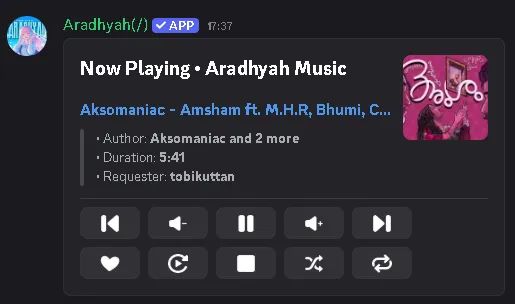
Designed with performance and simplicity in mind, Aradhyah Music offers intuitive slash commands, responsive controls, and stable playback. Users can easily manage queues, adjust volume, shuffle tracks, repeat songs, and control music without leaving Discord.
Features
- High-quality audio playback
- Playlist support
- Queue management
- Autoplay and loop modes
- Volume control
- Pause, resume, skip, seek, and shuffle
- 24/7 voice mode
- Support for multiple music sources
- Fast and responsive slash commands
- Reliable performance and regular updates
Whether you're hosting community events, gaming with friends, studying, or simply enjoying music together, Aradhyah Music provides a smooth and enjoyable experience with minimal setup and maximum reliability.
The bot is actively maintained with continuous improvements, bug fixes, and new features to ensure the best possible experience for every Discord server.
Support Server
Need help or have a question? Join our Support Server to get assistance from our team, report bugs, suggest new features, and stay up to date with the latest announcements and updates. We're always happy to help and welcome your feedback to make Aradhyah Music even better.
Popular Commands
| Command | Description |
|---|---|
/play | Play a song or playlist queryA song name, video link, or playlist link |
/playlist | Create and play your own playlists createCreate a new playlist listList your playlists viewOpen a playlist and browse its songs addSave the song playing now, or search new songs, into a playlist removeTake songs out of one of your playlists renameRename one of your playlists deleteDelete one of your playlists for good playLoad a playlist into the queue and play it |
/volume | Change the player volume levelVolume from 1 to 200 (80 is the sweet spot) |
/join | Connect to your voice channel |
/ping | Check gateway and Lavalink latency |
Tags
Monetization
Languages
Similar Bots
Other social bots you might like






Popular on UpBot
Trending bots in our directory