
Media Gallery
About Cadence
🎵 Cadence
Automatic Spotify drops for your Discord server.
Set it once, forget it. Cadence picks a random track from your Spotify playlists and posts it automatically ; on your schedule, styled exactly the way you want.
🎉 7-day free trial ; no card required
Every new server gets 7 days of full access, completely free. No credit card, no commitment. Just run /setup, configure your channel and playlist, and Cadence starts posting automatically.
After your trial: $4.99/month via Ko-fi. About the price of a coffee. Cancel any time.
✨ What Cadence does
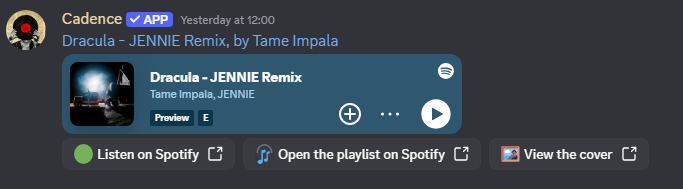
Cadence is not a playback bot. It doesn't stream music into a voice channel. Instead, it acts like an automated DJ curator ; posting a rich, fully-branded music message to a text channel on a schedule you control.
Perfect for:
- Music-focused communities that want a daily or weekly track discovery post
- Vibe servers that want ambient cultural content without manual effort
- Artist or fan servers that want to highlight tracks from a curated playlist
- Any server that wants to feel alive and active without admin effort
⚙️ How it works
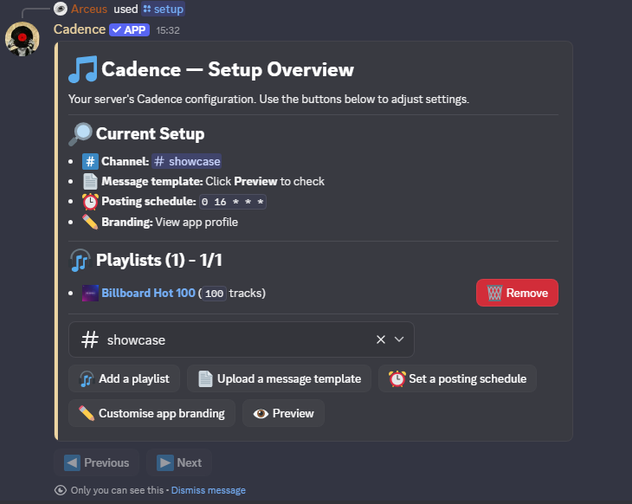
1. Add Cadence and run /setup
A guided wizard walks you through everything in Discord. No external dashboard needed.
2. Pick a channel
Cadence will post to any text channel you choose.
3. Set your Spotify playlists
Add one or more Spotify playlist URLs. Cadence picks randomly across all of them.
4. Design your message
Paste a message template built in Discohook ; any embed layout you want. Cadence fills in {track.name}, {track.album.cover}, {track.url}, and more automatically.
5. Set your schedule
Use a standard cron expression like 0 12 * * * (daily at noon UTC) or pick from built-in presets:
- 🌅 Daily at noon
- ☀️ Weekday mornings
- 🌙 Daily evenings
6. Done ; sit back
Cadence posts automatically, forever, until you tell it to stop.
🎛️ Template variables
| Variable | Value |
|---|---|
{track.name} |
Track title |
{track.url} |
Spotify link |
{track.artist.name} |
Primary artist |
{track.artists} |
All artists, comma-separated |
{track.album.name} |
Album name |
{track.album.cover} |
Album artwork URL |
{track.album.release_date} |
Release date |
{track.duration} |
Duration (mm:ss) |
{track.content} |
Explicit / Safe |
{playlist.name} |
Playlist name |
{playlist.url} |
Spotify playlist link |
{playlist.image} |
Playlist cover URL |
🖌️ Custom branding
Make Cadence feel like it belongs to your server:
- Custom nickname ; Cadence can appear with any name in your server
- Custom bio ; shown in Cadence's server profile
- Custom avatar ; upload any image
- Custom banner ; upload any image
All branding is per-server. Cadence looks different in every server that customises it.
📋 Commands
| Command | Description |
|---|---|
/setup |
Open the setup wizard ; configure everything from here |
/help |
See what Cadence does and how to get started |
Cadence uses Discord's native slash command interface. Everything is done through /setup ; no prefix commands, no external website.
💳 Pricing
| Free Trial | Subscription | |
|---|---|---|
| Duration | 7 days | Monthly |
| Price | Free | $4.99 / month |
| Auto posting | ✅ | ✅ |
| Custom templates | ✅ | ✅ |
| Custom branding | ✅ | ✅ |
| Multiple playlists | ✅ | ✅ |
| Cancel anytime | — | ✅ |
Subscriptions are managed through Ko-fi. Link your Ko-fi account to your server via /setup after subscribing.
❓ FAQ
Does Cadence play music in voice channels?
No. Cadence posts track information and artwork to a text channel. It's a curator, not a player.
Which Spotify playlists can I use?
Any public Spotify playlist. Private playlists and local files are not supported.
Can I have multiple playlists?
Yes. Add as many as you want. Cadence picks randomly from the combined pool of tracks across all playlists.
Can I use it on multiple servers?
Each server requires its own subscription. One Ko-fi subscription = one server.
What if my trial expires?
Cadence stops posting and sends a notification to your configured channel. You can subscribe at any point to resume ; no reconfiguration needed.
How do I cancel?
Cancel directly from your Ko-fi account. Cadence stops posting at the end of the billing period.
🔗 Links
- Support server: https://discord.gg/yctthGewQF
- Subscribe (Ko-fi): https://ko-fi.com/arceusdev
- Terms of Service: https://rentry.co/cadence-terms-of-service
- Privacy Policy: https://rentry.co/cadence-privacy-policy
Popular Commands
| Command | Description |
|---|---|
/help | Learn what Cadence does and how to get started. |
/setup | Configure Cadence for this server. |
Categories
Tags
Monetization
Languages
Similar Bots
Other social bots you might like





Popular on UpBot
Trending bots in our directory