
Amusement Club
7,580 serversMedia Gallery

About Amusement Club
Amusement Club is a global card collecting and trading game with your favorite characters founded in 2017. Since then we accumulated a lot of beautiful cards with unique templates crafted by the community.
Please visit club.amusement.cafe for more info.
Start with daily
You can use /daily every 20 hours. This will reset your claim cost and give you quest(s). For your first daily you will get a bot profile and stats in current guild (server where you run the command). Check yourself out with /profile!
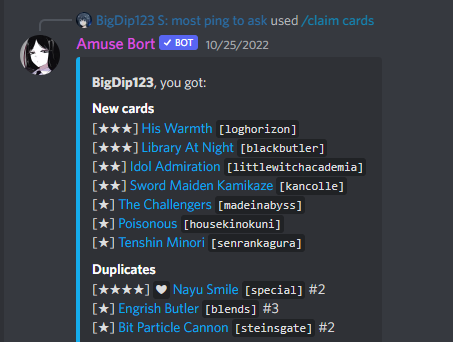
To get cards use /claim cards. You can specify how many cards you want by adding a number (e.g. /claim cards count:4 for 4 cards). Be careful because claim price grows by 50 with every new card so keep track of your /balance which will indicate how much your current claim is. To reset your claim cost you would need to use /daily.
Don't forget to get more tomatoes by completing your /quest list!
See your cards
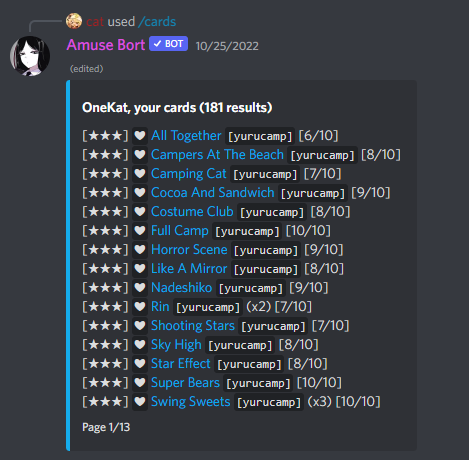
You can list your cards using /cards. This command accepts a whole query that can fetch and sort cards however you want. For example, if you want to see your 3-star cards from Touhou, you would use /cards card_query:-touhou -3.
Summon your card for everyone to see using /summon card_query:[query]. You can specify the same card query except this time bot will select one best matching card. To get more information about this card use /info card_query:[query].
Add the cards you like to you favorites using /fav card_query:[query]. You can see your favorite card list with /cards card_query:-fav.
You can also check the list of cards that you are missing with /miss card_query:[query] or see the global list with /cards global:True card_query:[query].
Trade with others
What makes the bot Amusing is that you can trade cards with other players. Card prices are set by bot, you can check them out using /eval card_query:[query]. To sell card to someone you need to use /sell one card_query:[query] user_id:@user and they have to accept it. You can also sell cards to bot for a reduced price using /sell one card_query:[query] or sell multiple cards with /sell many card_query:[query].
If you cannot find anyone who would buy your exclusive cards, you can always put them on Auction. Use /auction sell card_query:[query] price:[price] or just /auction sell card_query:[query] where bot will set a base price as card's Eval. Check your auctions with /auction list me:True. Check other auctions with /auction list card_query:[query].
Popular Commands
| Command | Description |
|---|---|
/daily | Use this command to claim your daily bonus and reset your claim cost! |
/draw | Draw a 1-3 star non-event card of your choosing! card_queryEnter either a card name, or card query here! |
/auction | Auction Head Command sellSell a card on auction listSee what cards are currently on auction infoSee information about a current or past auction! bidBid on a currently running auction! previewView up to 25 auction infos at once! cancelCancel an auction you have placed that has not gotten a bid. |
/inventory | Base command for inventory! listView all of your current inventory items (recipes, blueprints, claim_tickets) infoGet information about a specific inventory item useUse an item in your inventory |
/claim | Claim cards! cardsClaim a card from a non-promotion collection historyView a list of your prior claims infoView information about a prior claim |
Categories
Tags
Monetization
Languages
Similar Bots
Other entertainment bots you might like






Popular on UpBot
Trending bots in our directory