

- Servers
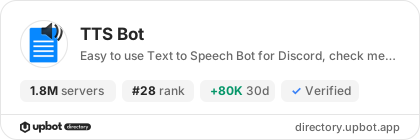
- 1,870,000
- Rank
- #28
- Last 7 days
- +20,000(+1.1%)
- Last 30 days
- +80,000(+4.5%)
About TTS Bot
Speak your messages alive with TTS!
TTS bot will speak your text messages into a voice channel automatically with no prefix required, perfect addition to #vc-no-mic channels!
- Simple setup (just one command!)
- Supports many TTS languages.
- Filters long messages, and has
/skipto avoid spam. - Large array of settings to tweak to make TTS Bot your own.
Growth History
Server count trends over the last 6 months
Popular Commands
| Command | Description |
|---|---|
/join | Joins the voice channel you're in! |
/clear | Clears the message queue! |
/leave | Leaves voice channel TTS Bot is in! |
/voices | Lists all the voices that TTS bot accepts for the current mode modeThe mode to see the voices for, leave blank for current |
/set | Changes a setting! channelSetup the bot to read messages from the given channel xsaidMakes the bot say "<user> said" before each message autojoinMakes the bot join the voice channel automatically when a message is sent in the setup channel required_roleChanges the required role to use the bot. voiceChanges the voice your messages are read in, full list in `/voices` server_voiceChanges the default language messages are read in modeChanges the voice mode that messages are read in for you server_modeChanges the default mode for TTS that messages are read in msg_lengthChanges the max length of a TTS message in seconds botignoreMakes the bot ignore messages sent by bots and webhooks translationMakes the bot translate all TTS messages to the same language translation_langChanges the target language for translation speaking_rateChanges the multiplier for how fast to speak nickReplaces your username in "<user> said" with a given name repeated_charactersChanges the max repetion of a character (0 = off) audience_ignoreMakes the bot ignore messages sent by members of the audience in stage channels require_voiceMakes the bot require people to be in the voice channel to TTS required_prefixChanges the required prefix for TTS. text_in_voiceMakes the bot read messages from text-in-voice channels skip_emojiMakes the bot skip emoji within messages avatarChanges the bot's avatar for this server |
Frequently Asked Questions
TTS Bot is a Discord bot in the Moderation and Tools, Utilities categories. Easy to use Text to Speech Bot for Discord, check me out!
TTS Bot is installed on approximately 1,870,000 Discord servers, ranking #28 on the Upbot Directory leaderboard.
Click the "Add to Server" button on this page, choose the server you manage, review the requested permissions and confirm. You need the "Manage Server" permission on that server.
The most used TTS Bot commands include /join, /clear, /leave, /voices, /set.
Yes, TTS Bot is verified by Discord.
Compare TTS Bot with
Side-by-side comparisons with similar popular bots.


Widget for TTS Bot
Do you develop TTS Bot? Show its server count, rank and growth on your website or README. Use the PNG where SVG images are not supported.
[](https://directory.upbot.app/bots/513423712582762502)Support Server

TTS Bot Support Server
39,568 Members
Categories
Tags
slashfreetts
Monetization
Languages
American English
Similar Bots
Other moderation and tools bots you might like


