

Queue Bot
11,900 servers+100 this week- Servers
- 11,900
- Rank
- #8675 in 30 days
- Last 7 days
- +100(+0.9%)
- Last 30 days
- +300(+2.6%)
Media Gallery
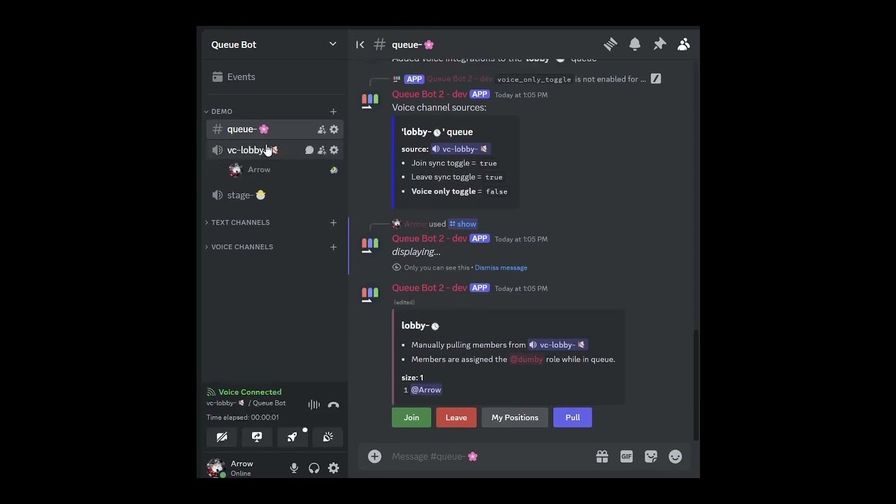
About Queue Bot
Queue Bot is a Discord bot that provides live user queues, is customizable, and easy to use.
⛑️ Support server | 🗃️ GitHub | 💖 Donate
Getting started
- Invite the bot to your server.
- Create a Queue - create a queue by typing
/queues add. You can create as many queues as you want. - Add Members - members can join by clicking the 'Join' button beneath queue displays,
/join, or by entering an integrated voice channel. Admins may also enqueue users with/members add. - Pull Members - members can be pulled from a queue by admins by clicking the 'Pull' button queue displays or
with
/pull. - Explore other commands -
/help generalexplains how to join and leave queues./help adminexplains how admins can manage queues.
Commands for everyone
/help - get helpful info/join - join a queue/leave - leave a queue/positions - get your positions in all queues/show - show queue(s)
Commands for admins
Admin commands are restricted to users with the Administrator permission and users added via /admins add.
/admins - manage admin users and roles/blacklist - manage blacklisted users and roles/clear - clear a queue/displays - manage display channels/logging - manage logging channels
/members - manage queue members/move - change the position of a queue member/prioritize - manage prioritized users and roles/pull - pull members from queue(s)/queues - manage queues/schedules - manage scheduled commands/shuffle - shuffle queue(s)/voice - manage voice integrations/whitelist - manage whitelisted users and roles
Growth History
Server count trends over the last 6 months
Popular Commands
| Command | Description |
|---|---|
/pull | Pull members from queue(s) queuesQueue(s) to pull members from numberNumber of queue members to pull queue_membersPull specific members instead of the next member |
/join | Join a queue queueQueue to join messageMessage to display next to your name in the queue |
/show | Show queue(s) queuesQueue(s) to display |
/members | Manage queue members getAlias for /show addAdd users or roles to a queue setUpdate a queue member message deleteKick members from a queue |
/queues | Manage queues getGet queues properties addCreate a queue setSet queue properties resetReset queue properties deleteDelete a queue |
Frequently Asked Questions
Widget for Queue Bot
Do you develop Queue Bot? Show its server count, rank and growth on your website or README. Use the PNG where SVG images are not supported.
[](https://directory.upbot.app/bots/679018301543677959)Categories
Tags
Monetization
Languages
Similar Bots
Other moderation and tools bots you might like


