
Media Gallery
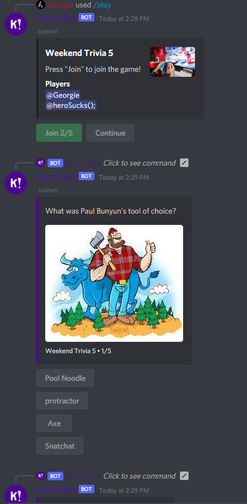
About KahootBot
KahootBot uses the Kahoot website to let you play Kahoots with your friends!
Getting a game to play is very simple:
Find a Kahoot you're interested in from the official Kahoot website (the link is available through the bot)
Run the command with either the full link or the Kahoot's ID https://create.kahoot.it/details/LONG-ID (a guide is also available through the bot)
KahootBot also uses Discord slash commands and buttons for an all-around smooth user experience!
KahootBot has a small number of commands:
/data to get basic information about a Kahoot
/play to start a game in a channel
Popular Commands
| Command | Description |
|---|---|
/activated | Sends a list of all the channels that are currently activated |
/play | Plays a quiz quiz_idThe ID of the quiz you want to play |
/info | Gives you information about the bot, including some important links, such as its invite. |
/add | Adds multiple IDs to a channel at once. (ID1 ID2 ID3 etc) idsThe IDs to add to the channel |
/beginfrenzy | Start playing in Frenzy Mode in the current channel |
Categories
Tags
Monetization
Languages
Similar Bots
Other entertainment bots you might like





Popular on UpBot
Trending bots in our directory