
Reputation Bot
2,240 serversMedia Gallery
About Reputation Bot
Reputation Bot
Reputation Bot helps your community recognize the people who actually make it great. It watches for thank-you messages, reactions, and mentions, and turns them into reputation points — no extra work needed from your members.
What It Does
The bot keeps track of who's helping who on your server and builds up reputation scores over time. You get leaderboards, user profiles, role rewards, and a ton of options to make it work exactly the way you want.
Ways to Give Reputation
There are several ways members can give reputation, and you can mix and match whichever ones fit your server:
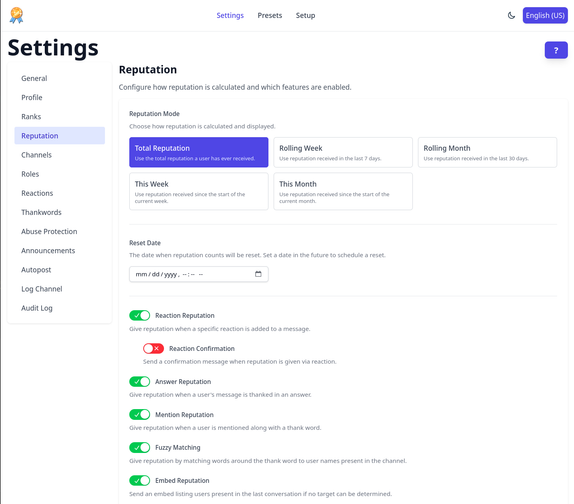
- Reply with thanks — Reply to someone's message with a thank-you phrase and they get reputation for it.
- Reaction — Add a medal emoji to a message to give reputation to whoever wrote it.
- Mention — Say something like "Thank you @Username" and the bot picks it up automatically.
- Fuzzy matching — Even "Thanks Anna!" without a mention gets detected through fuzzy name matching.
- Slash command — Use
/reputationto give reputation directly to someone. - Embed picker — When it's not clear who should get the reputation, the bot shows a picker so the right person gets credited.
Features
- Automatic detection — The bot handles everything on its own. No moderator input needed.
- Abuse protection — Cooldowns and limits keep people from gaming the system.
- Reputation profiles — Every user gets a profile with their reputation history and stats.
- Reputation roles — Automatically hand out roles when members hit certain reputation milestones.
- Works everywhere — Text channels, voice chats, threads, forums — it all works.
- Highly customizable — Turn individual features on or off and combine them however you like.
- Channels and categories — Enable the bot for specific channels or whole categories at once.
- Level up messages — Send a message when someone reaches a new reputation level to keep things exciting.
- Role restrictions — Limit who can give or receive reputation based on roles.
- Message scanner — Already have a lot of messages? The bot can scan them for thank-you phrases to get you started.
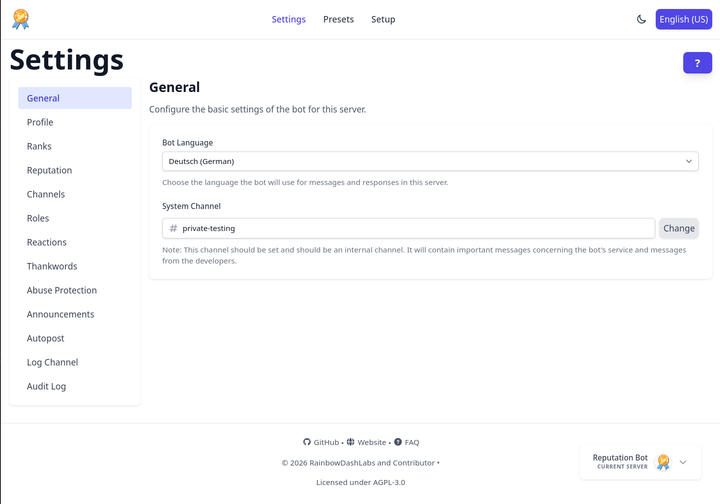
- Web dashboard — Change all your settings through a clean web interface instead of bot commands.
- Privacy — Messages are never stored. Only the reputation events themselves are kept.
- Open source — The full source code is out there for anyone to look at.
- Audit log — Keep track of who changed what in your server settings.
- Custom thank words — Add your own thank-you phrases in any language.
Supporter Features
These features can be unlocked per server, either by supporting the bot on discord, Ko-fi or by voting and spending vote tokens.
- Custom branding — Give the bot a custom name, profile picture, and reputation label on your server.
- Log channel — Get a log entry in a dedicated channel for every reputation event.
- Autopost rankings — Automatically post the leaderboard on a schedule to keep members motivated.
- Unlimited channels and categories — No cap on how many channels or categories the bot is active in.
- Advanced rankings — See not just who received the most reputation, but also who gave the most.
- Additional emojis — Use multiple different emojis to give reputation via reactions.
- Detailed profiles — Show more stats and info on user reputation profiles.
- Full reputation log — Access the complete history of all reputation events, page by page.
- Longer analyzer log — Keep analyzer logs around longer so you can review them later.
Popular Commands
| Command | Description |
|---|---|
/dashboard | Get information about this server. |
/top | Ranking of your server. modeReputation mode |
/repadmin | Manage reputation of users. reputationChange reputation of a user. resetdateManage the reset date of the reputation log. profileShow the internal reputation profile of a user. |
/profile | Information about you or others. userThe user you want to see the information about. detailedEnable detailed profiles |
/setup | Perform a basic setup of the bot. |
Categories
Tags
Monetization
Languages
Similar Bots
Other moderation and tools bots you might like






Popular on UpBot
Trending bots in our directory