
Media Gallery
Image
Image
Image
About Ostra
Experience a modern, flexible moderation system your team will love. Ostra's Moderation Dashboard and seamless interoperability with other bots makes moderation a breeze.
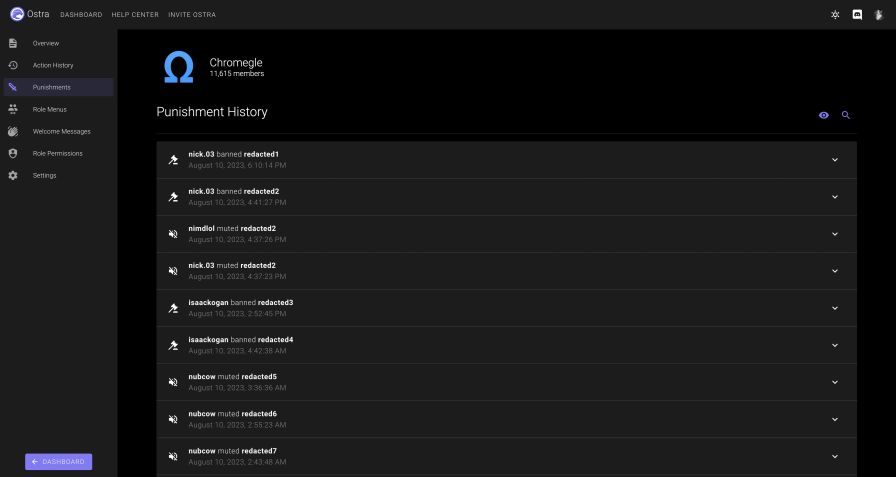
- Track warns, kicks, mutes (which use native Discord timeouts), and bans all in one place.
- Create punishments with any duration you'd like, even timeouts, which are normally limited to 4 weeks by Discord.
- The dashboard isn't just for admins! Ostra's Moderation Dashboard offers a fresh, easy-to-use interface for managing punishments.
- Easy-to-use punishment history: simply use /history
, and you can see a comprehensive list of punishments issued to that user, which staff member created the punishment, and who reverted it. - Moderation actions performed via native Discord features or even other moderation bots are detected by Ostra as well. Finally, you can keep a watchful eye on everything that happens in your server from one place.
- Learn more at our Moderation guide.
Beautiful, modern role menus that make reaction roles look like an ancient workaround
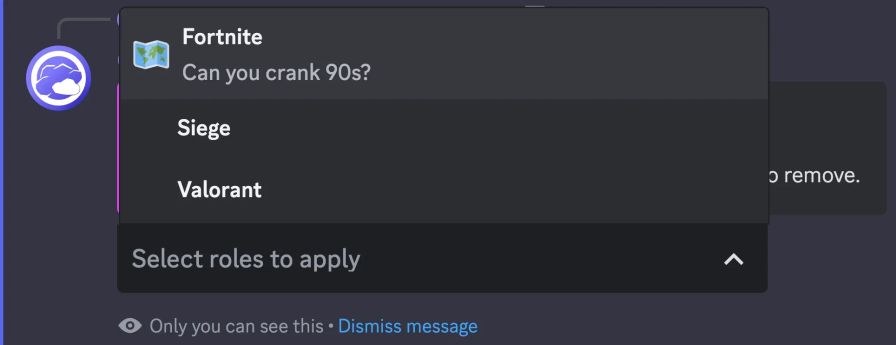
- No more confusing messages flooded with reactions, Ostra's role menus use a discrete drop-down menu, which you can completely configure.
- Add up to 25 roles per role menu, with no limit to how many role menus you can have!
- Choose between two different types of role menus: Select One, which only allows the user to have one role from the menu active at a time, or Select Multiple, which allows the user to select as many roles as they want.
- Use any custom emoji in your server, or use a built-in Discord emoji to represent your roles.
- Give your roles a brief description so your users know what to pick!
- Anyone visiting your server on mobile devices will love the improvement!
- Learn more at our Role Menus guide.
Easy-to-use, highly customizable welcome messages
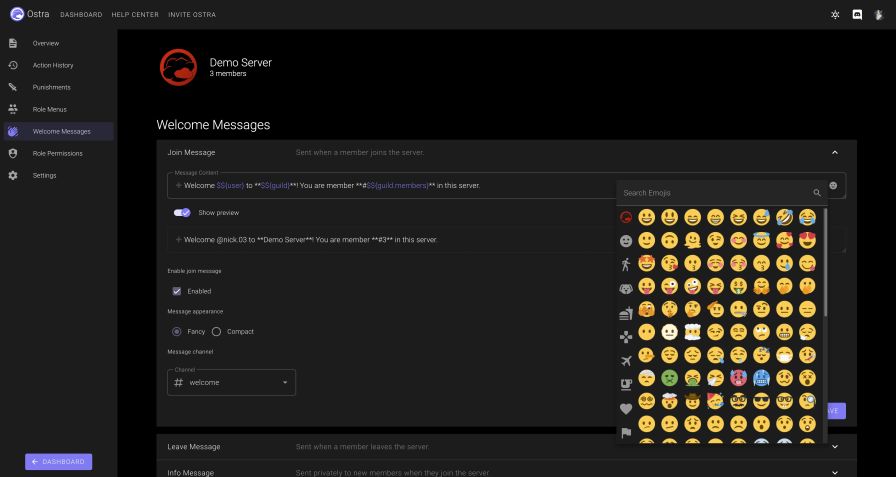
- Configure custom join, leave, and DM info messages for your server.
- Using $${expressions}, you can include many different dynamic values in your welcome messages. View more information on our Welcome Messages guide!
- Set different channels for your join and leave messages
- Configure Welcome Messages using our modern Welcome Messages editor, with a built-in emoji picker and syntax highlighting for expressions.
- Switch between Fancy Mode and Compact Mode to fit your server's needs!
- Learn more at our Welcome Messages guide.
Popular Commands
| Command | Description |
|---|---|
/ban | Bans a member from the server. memberBans a member from the server. idBans a member given their Discord ID, even if they aren't in the server. |
/lock | Lock channels, preventing communication in them. categoryLock an entire channel category, locking all channels you have permission to lock. channelLock an individual channel. serverLock the entire server, locking all channels you have permission to lock. uncategorizedLock all uncategorized channels, locking all channels you have permission to lock. |
/dashboard | Sends the link to launch the dashboard for this server. |
/rolemenus | Create and manage Role Menus for this server. |
/purge | Bulk-deletes messages from the channel. amountAmount of messages to delete from the channel. reasonIf provided, this reason will be logged. |
Categories
Tags
dashboardmoderationrole menusutilitywelcome messages
Monetization
Languages
American English
Similar Bots
Other moderation and tools bots you might like





Popular on UpBot
Trending bots in our directory