Media Gallery
Image
YouTube
About Bookmarker
Best bookmarking bot on Discord
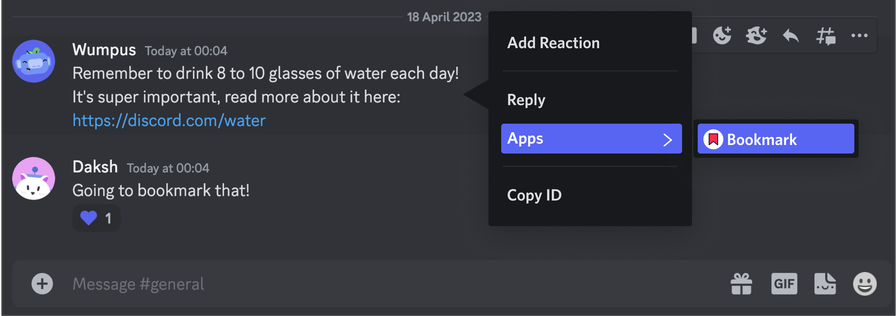
Simply add the bot then Right click (tap and hold) on message --> Apps --> Bookmark and Bookmarker will DM you the message. Bot needs no permissions to be able to bookmark messages.
Bookmarker does not store or collect any data.
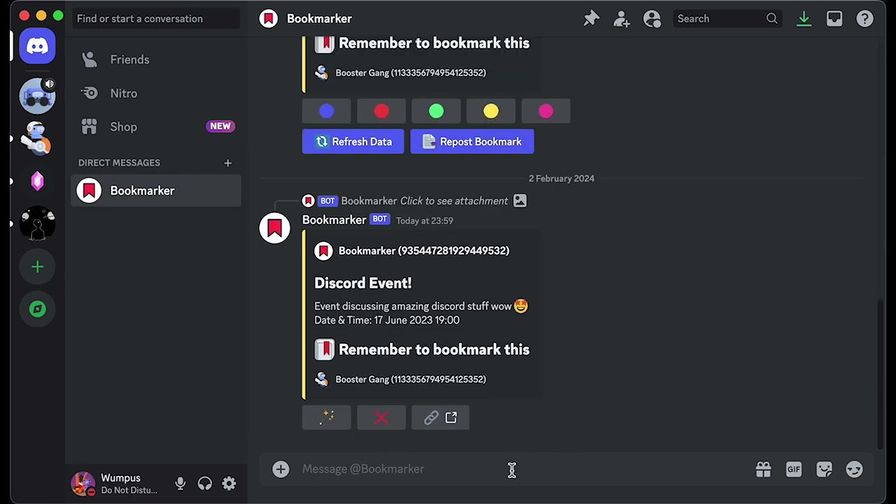
After bookmarking a message you can manage and organise your bookmarks by clicking the 🪄 button which allows you to:
- 🎨 Change the colour of the bookmark for visual categorisation
- 📑 Repost the bookmark so that an older bookmark will show up as a new message
- ✏️ Add note to any bookmark -📱 Mobile view shows the bookmark as plain text so it's easy to copy
You can also delete the bookmark by clicking ❌ and jump to the original message by clicking 🔗
Pro tip: You can pin bookmarks that you need to refer back to often by right clicking on a bookmarked message —> Pin message
Popular Commands
| Command | Description |
|---|---|
/help | Information about Bookmarker |
Categories
Tags
24/7bookmarkfreeopensourceutility
Monetization
Languages
CzechItalianPolishHungarianKoreanSwedish (Sweden)American EnglishTurkish
Links
Similar Bots
Other moderation and tools bots you might like





Popular on UpBot
Trending bots in our directory