

Bad Word Blocker
Verified15,200 servers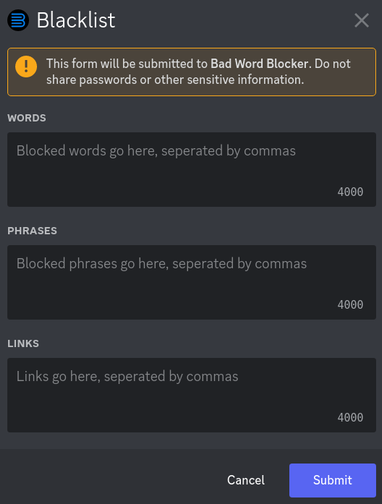
General description
Bad Word Blocker is a Discord bot that can block bad words, links, and phrases. Everything that should be blocked is organized in a "blacklist" that can be accessed with the /blacklist slash command. It also supports strikes, limits, and channel/roles bypass.
How it works
When a message is sent, the bot checks it against the blacklist. If it contains any blacklisted items, the message will be deleted. Optionally, you can set limits on how many times a user may use blacklisted items before receiving a punishment. See “Strikes and Limits” below.
Features
Strikes and Limits
If set up, every time a member gets their message deleted, they will get a "strike". With the limiting feature, you can set corresponding punishments for any strike amount. For example, you could set it up in such a way that it takes 2 strikes to get timed out, 3 strikes to get kicked, and 5 strikes to get banned. Read more about this feature here
Customization
When a message is blocked, by default, the bot will send an embed saying a message contained blacklisted items. The title, description, and color of the embed can be changed with /customize embed. Embeds can be disabled, or set to delete after a certain amount of seconds. More on that here
Logs
If a log channel is set with /log set, Bad Word Blocker will notify the channel when a message is blocked. Click here for more
Other Languages
Bad Word Blocker is an English bot. However, if you add non-English items to the blacklist, it will also work.
Support
If you need support, please join the support server and just ask your question. Your question should be answered within 12 hours. (The server is checked every day).
Premium
Bad Word Blocker relies on premium users' support to run the bot. If you would like to support Bad Word Blocker while getting access to more features, please become a premium supporter.
Documentation
Click here for a full guide on how to use the bot.
bypassesView, add, and remove bypassing roles and channels
limitsLimits command
add – Add a limit
manage – View and/or remove existing limits
logLog command
set – Set a channel to send logs in
manage – View and/or delete the current log channel
blacklistModify this server's blacklist
getGet your last blocked message back
Similar Moderation and Tools Bots
Discover other moderation and tools bots that might interest you



Popular Discord Bots
Check out the most popular bots in our directory



Discover More Bots
Explore our complete directory of Discord bots to find the perfect ones for your server