
M.O.D
Verified1,700 servers
MOD (Moderator On Duty) uses machine learning to identify toxic messages and deletes them, making it easier to maintain a healthy discord server.
MOD is configurable through slash (/) commands and setup is required:
It's not necessary to choose a channel or a role but you still must run the command
setup logchannel
If you ever want to change your server's log channel or bypass-role you can simply run the setup command again and select new options. You're only able to have one bypass-role. However, the server owner, Administrators and members with the manage messages permission will bypass the detection.
Please read our documentation (https://docs.shimz.eu.org/) and join our Discord server(https://discord.gg/j93zcFYZ4c) for support and reporting problems.
helpDisplay's info on the current commands.
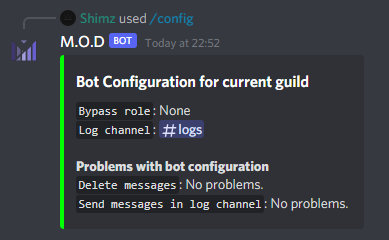
configView the bot's current configuration, and any problems with it.
botinfoGet information about the bot.
analyzeAnalyze how toxic a message is.
text* – The text to analyze.
setupThis command is required for the bot to work. You can choose log channel and a bypass role.
logchannel – Set the channel in which the bot will log messages, or no channel at all.
bypassrole – Which roles should bypass the bot, or no roles at all.
threshold – Set the threshold toxicity percentage the bot to delete messages. The default is 90.
delete – Set whether the bot should delete toxic messages or just log them.
Similar Moderation and Tools Bots
Discover other moderation and tools bots that might interest you



Popular Discord Bots
Check out the most popular bots in our directory



Discover More Bots
Explore our complete directory of Discord bots to find the perfect ones for your server