

JukeBox
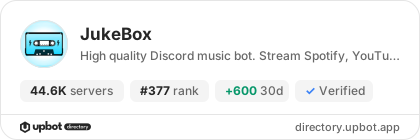
44,600 servers+100 this week- Servers
- 44,600
- Rank
- #377
- Last 7 days
- +100(+0.2%)
- Last 30 days
- +600(+1.4%)
Media Gallery

About JukeBox
🎵 JukeBox: High Quality Discord Music Bot
Transform your server's voice channels into a 24/7 music lounge. JukeBox delivers crystal-clear audio streaming, instant slash commands, and interactive button controls with zero lag, zero buffering, and 99.9% uptime.
🎧 Supported Audio Platforms
JukeBox connects directly to the world's leading music services:
- Spotify: Direct song, album, playlist, and artist link resolution
- YouTube: High-res playback, single tracks, and full public playlists
- Apple Music: Fast streaming of Apple Music tracks and curated albums
- SoundCloud: Indie releases, underground remixes, and podcasts
- Deezer: High-bitrate audio streaming with rich track metadata
- Direct Audio Uploads: Stream your own MP3, WAV, and FLAC files with
/playfile
Core Features for Discord Communities
Direct Spotify Profile Integration
Connect your personal Spotify account directly to JukeBox with /spotify. Once linked, browse your public playlists, saved collections, and top artists, and queue them into voice with a single click.
Cross-Server Personal Favorites
Never lose a song you discover in voice:
- Click the ❤️ Like button on any now-playing message to save that track to your personal collection.
- Use
/likedin any server JukeBox is in to browse, manage, and play your saved favorites library.
Live Synchronized Lyrics (Karaoke Mode)
Sing along with friends in real time. Run /lyrics to display time-coded synchronized lyrics that scroll live with the music right inside Discord.
Permanent 24/7 Voice Channel Stay & Smart Autopause
Keep your music lounge active 24 hours a day, 7 days a week:
/247binds JukeBox to your voice channel so it never leaves when the room empties./autopauseautomatically pauses audio when voice is empty and resumes playback the moment members return.
18 Studio Equalizer & DSP Audio Filters
Customize your audio on the fly with hardware-accelerated sound presets:
8D Audio • Bassboost • Nightcore • Vaporwave • Slowmo • TrebleBass • Karaoke • Pop • Soft • Electronic • Darth Vader • Demon • Chipmunk • China • Crazy • Party
Toggle presets instantly with zero audio interruptions.
Server DJ Governance & Channel Security
Maintain order during large community voice sessions:
- DJ Roles (
/djmode&/djroles): Restrict skips, volume changes, and filter controls to trusted DJs. - Text Channel Locking (
/textchannels): Keep music bot commands contained in designated music channels. - Voice Channel Locking (
/voicechannels): Limit bot joins to authorized voice lounges.
Stage Channel Topic & Voice Status Sync
- Automatically updates Discord Stage Channel Topics with the active song and artist (
/stagetopic). - Syncs the current track name directly to the Voice Channel Status banner (
/voicestatus).
Command Quick Reference
Music & Playback
/play [song/url]: Stream from Spotify, YouTube, Apple Music, or SoundCloud/search [query]: Interactive 10-result track selection menu/playfile [attachment]: Stream custom MP3, WAV, or FLAC audio files/pause&/resume: Pause or resume playback/skip&/previous: Jump to next or previous track/replay: Restart the current song from the beginning/seek [timestamp]: Seek to any point in the track (e.g.1:45)/volume [level]: Adjust audio volume from 1% to 100%/nowplaying: View the current song, progress bar, and requester
Queue & Discovery
/queue: View the upcoming song queue with pagination and total runtime/removedupes: Automatically remove duplicate tracks from the queue/shuffle: Randomize queue track order/loop [mode]: Toggle track loop, queue loop, or off/autoplay: Smart recommendations that keep music playing when queue ends/clear: Wipe the current playback queue
Features & Settings
/spotify: Connect your Spotify account to load playlists/liked: Browse and play your saved favorites collection/lyrics: Display live synchronized karaoke lyrics/filters: Apply 8D, Bassboost, Nightcore, or 15 other audio presets/grab: Send current track info and links directly to your DMs/247: Toggle permanent voice channel stay/autopause: Automatically pause when VC is empty and resume on join/djmode: Enable DJ-only permissions for playback controls
Multi-Room Music Fleet (Concurrent Voice Lounges)
Host simultaneous listening rooms in different voice channels on the same server:
- Add JukeBox 1 (Main Bot)
- Add JukeBox 2 (Multi-Room Companion)
- Add JukeBox 3 (Multi-Room Companion)
Quick 3-Step Setup
- Invite JukeBox to your server.
- Join any voice channel.
- **Type `/play [song
Growth History
Server count trends over the last 6 months
Popular Commands
| Command | Description |
|---|---|
/stop | Stop playback immediately and clear all tracks from the queue. |
/disconnect | Make the bot leave the voice channel and end the session. |
/join | Make the bot join your current voice channel. |
/play | Play music by entering a song name or link. songSong name or link |
/skip | Skip the currently playing track or jump ahead multiple tracks. numberNumber of tracks to skip (default: 1) |
Frequently Asked Questions
Widget for JukeBox
Do you develop JukeBox? Show its server count, rank and growth on your website or README. Use the PNG where SVG images are not supported.
[](https://directory.upbot.app/bots/1192477105833910332)Categories
Tags
Monetization
Languages
Similar Bots
Other utilities bots you might like


