
Media Gallery
Image
About Ticket Pro
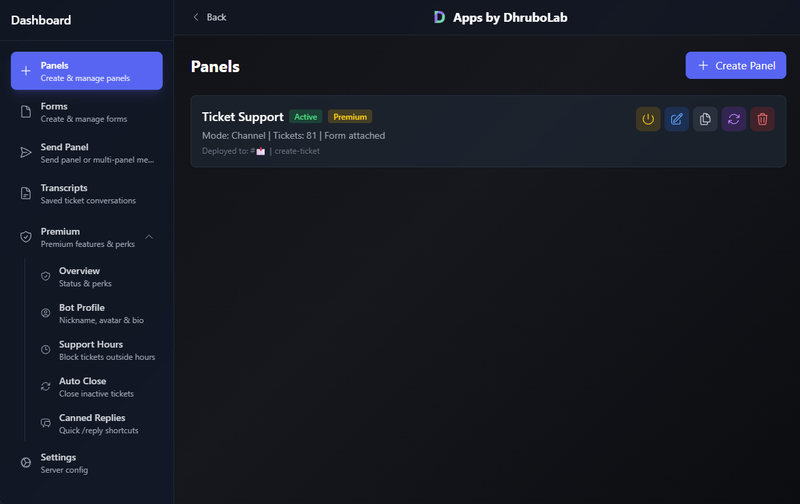
Why Ticket Pro?
Bringing professional ticket management to Discord with an intuitive dashboard, powerful customization, and everything you need to streamline support.
Key Highlights
- 🖥️ Modern Dashboard : Configure and manage your entire ticket system through an intuitive web interface.
- 🎨 Fully Customizable : Design your ticket panels exactly how you want them
- 📝 Custom Forms : Collect detailed information with built-in form builder
- 🔐 Advanced Permissions : Role-based access control and blacklist management
- ⚡ Dual Mode Support : Choose between channel-based or thread-based tickets
- 📊 Multi-Panel System : Run multiple ticket types for different purposes (premium: unlimited)
- 🕒 Support Hours : Control when tickets can open — any timezone, with a custom off-hours message
- 🌙 Auto-Close : Inactive tickets close themselves with Reopen/Delete options
- ⚡ Quick Replies : Instant canned responses via /reply with autocomplete
- ⭐ Ticket Ratings : Collect 1–5 star satisfaction feedback after close
- 🎫 Professional Transcripts : HTML transcripts with full message history, viewable & downloadable
- ✨ Rich Embeds : Custom embed fields on panel messages for cleaner layouts
- 🎨 Custom Branding : Personalize your bot's identity — avatar, banner, bio & nickname — right from the dashboard
Getting Started
- Invite Ticket Pro to your server
- Run
/setupto open the dashboard - Open the dashboard and follow the guided setup to create your first panel
- Deploy it to any channel with a single click
- You're done! Powerful ticket management with an easy-to-use dashboard.
Features at a Glance
- Panel Management: Create, edit, duplicate, and delete panels effortlessly
- Form Builder: Design custom intake forms with multiple field types
- Access Control: Role restrictions, user blacklists, and support team assignments
- Ticket Controls: Claim, close, reopen, rename, and manage with slash commands
- Smart Permissions: Automatic permission verification and helpful error messages
- Server Settings: Configure claims, blacklists, and more
- Support Hours: Block ticket creation outside your schedule, in any timezone
- Auto-Close: Close inactive tickets automatically after a configurable timeout
- Canned Replies: Quick answers for faster support with /reply suggestions
- Ratings: 1–5 star feedback after every closed ticket
- Transcript System: Beautiful HTML transcripts with images and full message history
- Transcript Retention: Saved in your dashboard for 7 days (free) or 30 days (premium)
- Custom Branding: Custom bot avatar, banner, bio & nickname per server
Join the Community
Keywords: ticket pro, discord ticket, discord ticket bot, ticket pro, ticket bot discord, support bot discord
Popular Commands
| Command | Description |
|---|---|
/add | Add a user to the current ticket userThe user to add to the ticket |
/help | Shows all available commands and their usage |
/claim | Claim the current ticket |
/setup | Configure Ticket Pro in your server |
/close | Close the current ticket |
Support Server

Anyaa & Reminder & Ticket Support
733 Members
Categories
Tags
supportthread ticketticketticket botsupport bot
Monetization
Languages
American English
Links
Similar Bots
Other moderation and tools bots you might like






Popular on UpBot
Trending bots in our directory